Aocure Power Point Template for Presentations
Putting together a strong presentation can feel like a challenge, especially when you want it to look professional without spending hours on design. The Aocure Power Point Template aims to solve this by offering a complete set of pre-designed slides that you can adapt to your own content. With 150 slides in total, spread across five color variations, this template gives you a wide range of options for different topics and audiences. Whether you are preparing for a client meeting, a classroom lecture, or a creative portfolio review, having a reliable template can save time and help you communicate your ideas clearly.
What the Aocure Power Point Template Offers
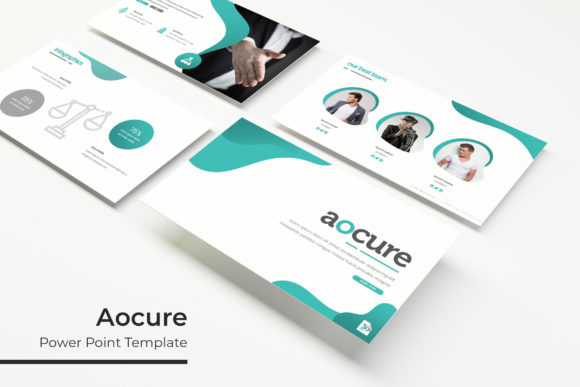
At its core, this template package provides five separate PowerPoint files, each with a distinct color scheme. Each file contains 30 slides, making the full collection of 150 slides available in a single download. The slides include handcrafted infographics, section breaks, gallery pages, and portfolio layouts. You will also find placeholders for images that you can replace by dragging and dropping your own pictures. The graphics are pixel-perfect and fully resizable, so they maintain quality whether you present on a laptop screen or a large display. Everything builds on Master Slides, which means changes you make to the master layout apply consistently across your presentation.
For anyone who has spent time aligning shapes or adjusting font sizes slide by slide, this structure can be a genuine relief. The template also comes with a readme file and a link to download the fonts used, so you have everything you need to get started. Just note that the photographs shown in the preview are not included; they serve only as examples to show you how your own images might look.
Why Different Audiences Might Choose This Template
People approach presentation design with different priorities. A beginner may care most about ease of use, while a seasoned professional might focus on flexibility and polish. The Aocure Power Point Template tries to balance these needs, but it helps to know how it fits into your own workflow.
Beginners and Casual Users
If you rarely make presentations and feel unsure about design, starting from a blank slide can be overwhelming. The Aocure Power Point Template gives you a ready-made structure. You can pick a color scheme that matches your topic or your brand, replace the placeholder text with your own words, and drop in your images. The drag-and-drop picture placeholders make this simple. You do not need to know how to use complex design tools. Everything already looks cohesive because the slides are crafted to work together. For a school project, a community group talk, or a first business pitch, this template can help you produce something that looks thoughtful and professional without a steep learning curve.
Professionals and Business Users
For consultants, managers, and sales teams, presentations often represent your work directly to clients or stakeholders. A polished template can reinforce credibility. With five color variations, you can adapt the same underlying structure for different clients or internal departments without starting over. The infographic slides are especially useful for presenting data, timelines, or processes in a way that is easy to understand. The portfolio and gallery slides also let you showcase products, case studies, or team achievements. If you frequently update presentations, the Master Slides approach means you can change fonts, colors, or logos once and see the update across all slides. This consistency can save time and reduce errors.
Educators and Trainers
Teachers, lecturers, and corporate trainers need to present information in a clear and engaging way. The section break slides help you organize content into logical parts, which is useful for longer sessions. You can use infographics to explain concepts visually, and the gallery slides can display student work or examples. The five color variations also let you create different visual themes for different courses or training modules. Because the template is fully editable, you can adapt the slides to your teaching style rather than the other way around. If you need to share materials with colleagues, the consistent layout makes collaboration easier.
Creators, Freelancers, and Small Business Owners
If you are a designer, photographer, or creative entrepreneur, your portfolio presentation often serves as an introduction to your work. The Aocure Power Point Template includes dedicated portfolio and gallery slides where you can place your images prominently. The pixel-perfect illustrations and clean layouts keep the focus on your visuals. You can also use the template for client proposals, social media strategy presentations, or brand guideline documents. Having multiple color schemes lets you match the presentation to your own brand identity. For freelancers who need to deliver professional materials quickly, having a template that works out of the box can be a practical asset.
Evaluating the Template Based on Your Priorities
Not every template suits every project, so it is worth thinking about what matters most to you.
Ease of Use and Speed
For anyone short on time, the drag-and-drop image placeholders and pre-built infographics reduce the amount of manual work. The included readme file and font links mean you are unlikely to get stuck on technical setup. If your main goal is to produce a solid presentation in under an hour, this template can help you get there.
Flexibility and Customization
Because the template uses Master Slides, you can make global changes efficiently. The graphic elements are resizable and editable, so you are not locked into fixed positions. The five color variations give you a starting point rather than a rigid system. If you enjoy customizing, you can take the template further by adjusting colors, swapping icons, or reordering slides. However, if you prefer total creative freedom and want to build every element from scratch, a template might feel limiting. The value here is for those who want a strong foundation but still room to personalize.
Quality and Polish
The handcrafted infographics and pixel-perfect illustrations suggest attention to detail. When you present, small visual cues like consistent spacing, aligned elements, and clear typography contribute to an overall professional impression. The template covers many common slide types, reducing the chance that you will need to create a layout from scratch halfway through your project.
Commercial Value and Long-Term Use
For business owners and frequent presenters, a template like this can be reused many times. Changing the color scheme or swapping content lets the same template feel fresh for different contexts. The five PPTX files mean you have multiple versions ready to go. Over time, the cost per use becomes very low compared to hiring a designer for each new presentation. Even if you outgrow the template eventually, the skills you practice while customizing it can help you become more confident with presentation software.
Practical Examples for Different Reader Types
Imagine a marketing consultant preparing a pitch for a potential client. They might choose the blue color variation for a conservative industry, use the infographic slides for market data, and include a portfolio slide to show past campaign results. Everything stays on brand, and the client sees a cohesive story.
Think of a university lecturer designing a course on environmental science. They could use the green color scheme, insert their own diagrams into the infographic slides, and rely on section breaks to separate modules on climate, biodiversity, and policy. Students follow the structure easily, and the lecturer can update content each semester without redesigning slides.
Consider a freelance photographer creating a portfolio presentation for a gallery opening. The gallery slides allow full-bleed images in a clean layout. The dark color variation might complement their work well. They only need to drop in their best photos and add captions. The result looks intentional and refined.
For a small business owner presenting a quarterly review to their team, the template offers a quick way to display sales figures, project timelines, and team achievements. The built-in infographics turn numbers into visuals that are easier to digest during a meeting.
Does the Aocure Power Point Template Match Your Goals?
This template is well suited if you need a versatile, ready-to-use presentation system that saves time and looks professional. It works for a range of contexts because of the variety of slide types and color options. If your priority is speed, consistency, and having a design foundation that you can trust, it matches that need well.
It may be less suitable if you require highly unique, avant-garde design that breaks traditional slide conventions, or if you prefer to build every visual element from scratch as part of your creative process. Similarly, if you never use PowerPoint and work exclusively in other software, this template is specific to the PPTX format.
Overall, understanding your own skill level, project type, and how much time you can invest in design will help you decide whether this template aligns with your workflow. For many people, having a reliable template means one less thing to worry about, letting them focus on the message instead of the mechanics of slide design.
Whether you are preparing for a one-time presentation or building a library of materials for ongoing use, the Aocure Power Point Template offers a balanced mix of structure, flexibility, and visual quality. By matching the template to your specific needs, you can create presentations that communicate clearly and leave a positive impression.