Christmas Greeting Social Media Post That Works for Any Campaign
Every year, the holiday season brings a familiar scramble for fresh, engaging content. Whether you are promoting a Christmas celebration event, running a seasonal sale, or simply sending warm wishes to your audience, the visual piece you put out matters more than you might think. A well-designed Christmas Greeting Social Media Post does not just decorate a feed—it communicates your brand's personality, invites interaction, and builds genuine connection during a time when people are actively looking to engage.
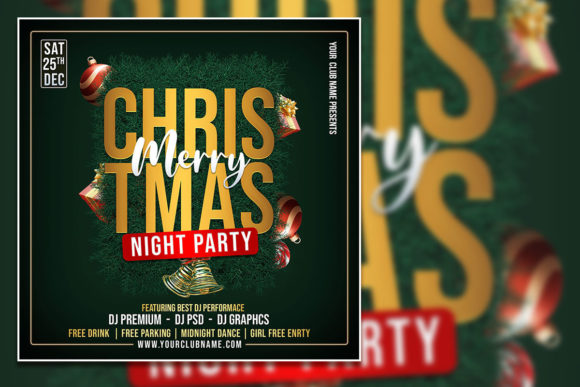
What makes this particular approach useful is its flexibility. Instead of starting from a blank canvas in Adobe Photoshop, you begin with a fully editable template that already handles layout, typography, color balance, and visual hierarchy. The Fully Editable Merry Christmas flyer template discussed here is a 2000 x 2000 pixel PSD file, 300 dpi, in RGB color mode. That resolution is ideal for both digital platforms and print-ready materials, so you can use the same design across Instagram, Facebook, email newsletters, or even physical flyers without quality loss.
Key Characteristics of a Professional Christmas Flyer Template
The strength of a template like this lies in its organized layer structure. Every element—text blocks, background, decorative graphics, and image placeholders—sits on its own layer. This makes editing straightforward even if you only have basic experience with Adobe Photoshop. You open the PSD file, select any text layer with the text tool, and replace the placeholder copy with your own message. The font download link is included in the help file, so you maintain the exact look shown in the preview.
One notable quality is the ability to replace the photo. The template includes a stock image, but you can swap it with your own photograph to create a more personalized and authentic Christmas Greeting Social Media Post. For a local bakery, that might mean a picture of your holiday cookies. For a real estate agency, it could be a photo of a decorated office or a community event. That small change transforms a generic design into something distinctly yours.
A 300 dpi resolution at 2000 x 2000 pixels means the file meets professional print standards while also being large enough for high-quality digital display. Many social media platforms crop images to square or near-square formats, so the square dimension is a practical choice that works across Instagram, Facebook, LinkedIn, and Twitter without awkward cropping.
Practical Applications Across Different Environments
This template is not limited to one type of use. Its versatility makes it suitable for personal, professional, educational, creative, digital, and commercial contexts.
For small business owners and entrepreneurs, the editable PSD becomes a reusable asset. You can create a Christmas celebration sale flyer by simply changing the headline to "Holiday Sale – 20% Off Everything" and adjusting the date details. The same base design can later be repurposed for a New Year promotion or a thank-you post by updating the text and swapping the photo. That efficiency saves hours of design time during the busiest season of the year.
Freelancers and creative professionals can use the template as a starting point for client projects. Instead of building every holiday post from scratch, you modify the template for each client's branding—changing colors, fonts, and imagery to match their visual identity. This speeds up delivery while still providing a polished final product.
Marketers and social media managers often need to produce multiple variations of the same message for different platforms. With an organized PSD, you can create a master design, then duplicate the file and adjust the copy for A/B testing. One version might emphasize the event invitation, while another highlights the sale. Having a structured template makes this process repeatable and fast.
Educators and bloggers can use the Christmas Greeting Social Media Post to announce holiday-themed content, share greetings with their audience, or promote a seasonal giveaway. The editable text means you do not need special design skills—just write your message, drop in a relevant photo, and export.
Nonprofits and community organizations often have limited budgets for design. An affordable template with a professional finish allows them to create appealing flyers for Christmas celebration events, fundraisers, or volunteer appreciation posts without hiring a designer.
Usability and Efficiency Benefits
One of the most immediate benefits is time saved. During the holiday season, every hour counts. Instead of wrestling with layer management or deciding where to place text, you get a layout that is already tested and balanced. You can focus on crafting your message rather than designing from scratch.
The organized layer structure also reduces the risk of accidentally breaking the design. If you need to adjust the background color, you can do so without affecting the text or the photo. If you want to hide or show certain decorative elements, you simply toggle layer visibility. This non-destructive editing workflow is forgiving for beginners and efficient for experienced users.
Appearance is another strong point. The template is designed with festive yet professional aesthetics. It avoids clichés that can make holiday posts look overly busy or dated. Clean typography, thoughtful spacing, and a balanced composition help your message stand out in a crowded social media feed.
From a branding perspective, customization is straightforward. You can replace the placeholder text with your brand name, tagline, or call-to-action. The font included in the download link complements the holiday theme, but you are free to use any font you prefer simply by selecting the text layer and typing. This flexibility means your Christmas Greeting Social Media Post aligns with your existing brand guidelines rather than forcing you into a preset style.
Realistic Use Cases and Observations
Consider a local boutique that wants to announce a Christmas Eve flash sale. Using the template, the owner replaces the photo with an image of their best-selling product, changes the headline to "Flash Sale – 30% Off Tonight Only," and adds the store hours. The entire edit takes under fifteen minutes. The result is a cohesive, on-brand post that drives urgency and feels personalized.
A freelance event planner might use the template to invite clients to a holiday networking mixer. They swap the photo with a shot from a previous successful event, update the text with the date and venue, and export a high-res JPG for both social media and printed flyers. The same file serves two purposes without any additional work.
I have observed that many users initially worry about the font installation step. The help file includes clear instructions, and since the font is freely available with a download link, the process is straightforward. Take five minutes to install the font before starting, and the template will open exactly as shown.
Another practical consideration: because the PSD is 300 dpi and 2000 x 2000 pixels, the file size is reasonable for download and storage, but it still maintains enough detail for professional printing. If you plan to print flyers at a local shop, this resolution produces crisp results without appearing pixelated.
Practical Considerations When Using the Template
Before you begin editing, confirm that you have Adobe Photoshop installed. The file is specifically saved in PSD format and requires Photoshop to access the organized layers and editable text. While there are free tools that can open PSD files, they often strip layer information or flatten text, which reduces the editing flexibility that makes this template valuable.
When replacing the photo, choose an image that matches the mood of your message. A warm, well-lit photograph works best for holiday greetings. Avoid overly busy backgrounds that might compete with the text placement. The template's layout reserves a clear area for the photo, so a focused subject produces the best visual result.
For text editing, keep your copy concise. Social media posts perform best when the message is scannable. The template provides placeholder text, but you should adjust the length to suit your specific announcement. If you include a date, time, or location, double-check that the information is accurate and easy to read at a glance.
If you plan to use the design across multiple platforms, save a master copy of the PSD before making platform-specific adjustments. That way, you can export a version for Instagram Stories (vertical), a version for Facebook feed (square), and a version for LinkedIn (horizontal) without repeatedly rebuilding the layout.
Finally, consider the timing of your post. A Christmas Greeting Social Media Post will perform best when published a few days before the actual holiday, giving your audience time to engage and respond. If you are promoting a sale or event, schedule the post early enough for people to plan their participation.
This template is a practical tool for anyone who needs a professional-looking holiday design without starting from zero. Whether you are a seasoned designer looking for a shortcut or a business owner trying to keep up with the seasonal content demand, the editable PSD delivers a reliable foundation that you can make your own.