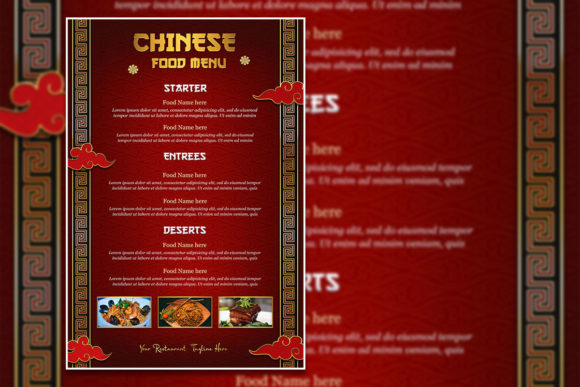
Customizable Chinese New Year Poster Templates for Every Occasion
Planning a Chinese New Year celebration involves many details, and visual promotion is often high on the list. Whether you are organizing a community gala, a corporate banquet, or a private family gathering, having the right invitation or flyer sets the tone. A Chinese New Year poster template offers a ready-made design that you can personalize without starting from scratch. The fully editable files allow you to swap text, adjust colors, and replace stock photos with your own images, making the final piece feel uniquely yours.
For many people, the thought of designing a professional-looking flyer seems daunting. You might not own advanced design software, or perhaps you have never opened Photoshop before. Yet the need for a polished announcement remains. These templates bridge that gap. They come as layered PSD files with organized folders, so even if your experience is limited, you can open the file, click on the text layer, and type your message. The included help file contains a link to download the font, which ensures your typography matches the intended style. This kind of structure removes guesswork and saves time.
Who Benefits from Editable Chinese New Year Flyers
Different people approach these templates with different priorities. A small business owner running a limited-time promotion for the holiday season cares about speed and consistency. They need a flyer that communicates the event details clearly and can be printed or shared online within minutes. A freelancer or creative professional, on the other hand, might evaluate the template for its flexibility. Can they adjust the layer blending? Does the resolution hold up for large-format printing? The same product serves both users, but each examines it through their own lens.
Beginners and Hobbyists
If you are new to design, the idea of editing a PSD file might feel intimidating at first. But these templates are built with beginners in mind. The layers are named clearly, and the text can be selected and replaced with just the text tool. You do not need to know how to create masks or adjust curves. Simply open the file in Adobe Photoshop, locate the text you want to change, highlight it, and type your own wording. If you want to swap the photo, you can drag your own image into the file and position it behind the design elements. The 300 dpi resolution means your final flyer will look crisp whether you print it at home or send it to a professional printer.
For hobbyists who enjoy creative projects, these templates offer a chance to experiment. You can try different color combinations, move elements around, or add your own graphics. The organized layer structure makes it easy to undo changes or return to the original version. This learning value is significant. You get a finished product while also picking up practical Photoshop skills along the way.
Creators and Professionals
For designers, marketers, and content creators, efficiency matters. A fully editable Chinese New Year flyer template provides a solid foundation. Instead of building a layout from scratch, you can focus on refinements that match your brand or event. The 2000 x 3000 pixel size at 300 dpi gives you enough resolution for high-quality prints or social media posts. You can adjust the RGB color mode to suit digital screens or convert it to CMYK if your printer requires it. Because the template is fully layered, you can hide elements you do not need, duplicate sections for variations, or combine multiple templates to create something entirely new.
Professionals who work with multiple clients will appreciate the instant download. Once you purchase the template, you have the PSD, a JPG preview, and a help file ready to use. This reliability allows you to deliver a polished flyer to a client within hours, not days. The commercial value is clear: you can bill for the customization work while the template handles the heavy lifting of layout and visual hierarchy.
Small Business Owners and Entrepreneurs
Running a business during Chinese New Year often means preparing special promotions or hosting events. A restaurant owner might want to invite loyal customers to a reunion dinner. A retail shop might announce a limited-time sale. A cultural center might promote a public celebration. In each case, a professional flyer builds credibility and excitement. With an editable template, you can quickly insert your business name, address, date, time, and a special offer. If you have a professional photo of your venue or team, you can replace the stock image to make the flyer more authentic.
Cost is another factor. Hiring a designer for a single flyer can be expensive, especially for small budgets. A template provides a one-time investment that you can reuse and modify for future events. You might change the colors for a different holiday or adjust the text for a new promotion. The long-term usefulness of a well-designed template often exceeds its initial purpose.
Educators and Community Organizers
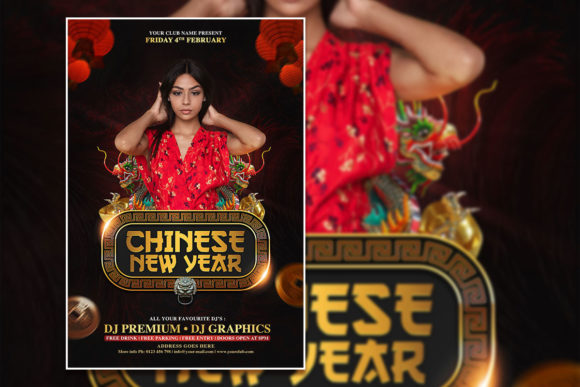
Teachers, coordinators, and volunteers often need to create announcements for school events, cultural fairs, or nonprofit gatherings. These templates help produce materials that look intentional and respectful of the holiday. Because the design already incorporates traditional Chinese New Year elements such as lanterns, cherry blossoms, or auspicious symbols, the flyer feels culturally appropriate. Educators can also use the template as a teaching tool. Students can edit the file to learn about layout, typography, and image placement, making it a practical exercise in digital design.
Practical Ways to Customize Your Flyer
The beauty of a fully editable template is that you control every visible element. Here are a few practical examples of how different users might approach customization:
- A restaurant owner replaces the stock photo with a high-resolution image of their dining room and adds a QR code linking to a reservation page. They change the headline to read "Lunar New Year Banquet" and list the menu items in bullet points below.
- A freelance event planner uses the template for multiple clients. They keep the overall layout but adjust the color palette to match each client's branding. For one client, they use gold and red. For another, they shift to pastels with gold accents. The layered file makes these changes quick.
- A parent organizing a school party swaps the photo for a group picture from last year's celebration. They update the text to include the date, time, and a note about bringing a dish to share. They print the flyer on standard letter paper and post it on the community board.
- A blogger promoting a free printable guide uses the template as a social media graphic. They resize the canvas slightly, add their blog logo, and export the file as a JPEG for Instagram. The high resolution ensures the text remains sharp on mobile screens.
Evaluating Whether This Template Matches Your Needs
Before purchasing, consider your own goals and skill level. If you have never used Photoshop, the template still works because the editing process is straightforward. The help file includes a download link for the font, so your text appears exactly as designed. If you prefer a different font, you can select the text layer and choose any typeface installed on your computer. The JPG preview gives you a clear reference of how the final design should look, which helps if you accidentally move something out of place.
If you need a flyer quickly and do not have time to learn complex software, this template saves you hours. The structure is logical, and the resolution supports both digital and print use. If you want to create something highly unique, the template still allows for extensive modification. You can delete layers, add your own graphics, or merge elements from other templates. The key is understanding that the template is a starting point, not a restriction.
For those who value reliability, the organized layer system and included JPG reference reduce the chance of errors. You can always revert to the original file if something goes wrong. This safety net matters when you are working under a deadline. The instant download means you can start editing immediately, without waiting for shipping or processing time.
Long-Term Value of an Editable Holiday Template
Chinese New Year comes once a year, but a well-made template can serve you for many seasons. You might use it this year for the celebration event, then modify it next year with updated dates and photos. If you run a business, you can adapt the template for other holidays by changing the background colors and text. The learning curve is minimal after the first use, so each subsequent edit becomes faster.
Creatives often build a library of templates for recurring events. Having a reusable flyer for Chinese New Year means you never have to rush at the last minute. You can plan ahead, create a draft, and then finalize it when details are confirmed. This approach reduces stress and improves the quality of your promotions. Whether you are a beginner finding your footing or a professional streamlining your workflow, a customizable poster template offers practical value that extends beyond a single project.
Ultimately, the right template matches your comfort level and your project's requirements. If you need a design that respects the cultural significance of the holiday while giving you full control over the message and imagery, a fully editable PSD file is a practical solution. The combination of high resolution, organized layers, and included support files makes it accessible to a wide range of users. By focusing on what you want to communicate and letting the template handle the visual structure, you can create a Chinese New Year flyer that feels personal, professional, and ready to share.