How a Fully Editable Birthday Celebration Invitation Template Streamlines Event Planning
Planning a birthday party involves dozens of decisions, from the guest list to the menu to the playlist. Among those decisions, the invitation sets the tone for everything that follows. It is often the first impression attendees receive, and it communicates the level of care and detail guests can expect. For anyone who wants a polished look without starting from scratch, a Birthday Celebration Invitation Template offers a practical middle ground between a generic online card and a costly custom design. These templates, particularly those delivered as fully editable PSD files, give you control over every visual element while eliminating the need for advanced design skills or expensive software beyond Adobe Photoshop.
What makes a template worth discussing is not just the aesthetic result, but the workflow it enables. When you download a Birthday Flyer Template that includes organized layers, high resolution, and embedded fonts, you are effectively getting a production-ready asset. The question is not whether such a template can look good, but whether it integrates smoothly into your existing planning process and delivers consistent quality across print and digital use. After working with several editable templates for events ranging from intimate family gatherings to promotional brand activations, I have found that the value lies in the details of the file structure and the flexibility of the design.
What Defines a Well-Made Birthday Celebration Flyer Template
A strong template does more than look attractive on a preview screen. It must withstand practical editing without breaking layout, shifting elements, or distorting text. The Birthday Celebration Flyer Template described here operates at 2000 x 3000 pixels with 300 dpi resolution, which translates to a print-ready size of approximately 6.67 by 10 inches. That resolution ensures sharp text and crisp image reproduction whether you print at home, use a local print shop, or share it digitally as a high-resolution JPG. The RGB color mode is standard for digital display, but if you plan to send the file to a commercial printer, you will want to convert to CMYK or confirm that your printer accepts RGB files.
One characteristic that distinguishes a professional template from a casual one is layer organization. When the PSD file arrives with clearly labeled groups and folders, you can locate the text layer for the event date, the background image, or the decorative elements in seconds. The product description for this template explicitly mentions organized layers, which is more important than many first-time users realize. Disorganized layers lead to frustration, accidental edits, and wasted time. For someone managing multiple aspects of event planning, an efficient editing process is a real advantage.
Resolution and Dimensions: Why They Matter for Both Print and Digital
The dimension of 2000 x 3000 pixels at 300 dpi is a deliberate choice. It accommodates standard flyer sizes while leaving enough pixel density for cropping or resizing without visible degradation. If you intend to use the template for social media headers, email invitations, or event pages, you can scale it down easily. Scaling up, however, is not recommended. A flyer designed at 300 dpi will not gain quality if enlarged beyond its native dimensions. That limitation is not a flaw of this particular template but a constraint of all raster-based PSD files. If you anticipate needing a larger format, such as a poster or banner, verify that the template size matches your output requirements before committing to the design.
Practical Value of a Fully Editable Birthday Flyer Template in Real-World Use
Editing a template like this one is straightforward when you have Adobe Photoshop installed. The process involves opening the PSD file, selecting the text layer with the text tool, and typing your own message. The font used in the template is included via a download link, so you maintain the exact typography shown in the preview. That consistency matters if you have chosen the design specifically because of its font pairing. Substituting a different font can shift text alignment, change the visual weight, or disrupt the layout if the replacement has different metrics. The help file provided with the template guides you through that process, which reduces the learning curve for users who are not full-time designers.
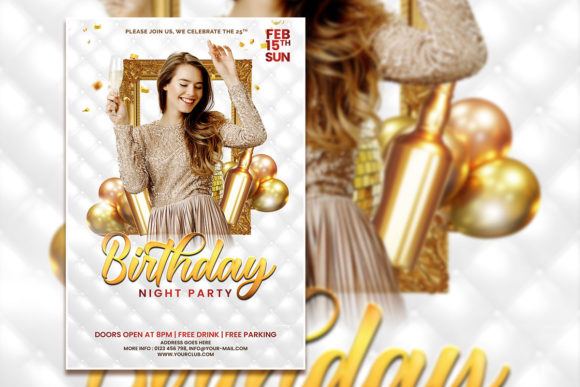
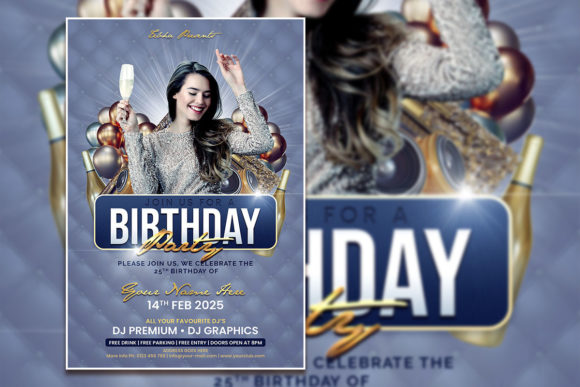
In my own workflow, I have used similar templates for client events where the branding needed to feel personal but still professional. The ability to replace the placeholder photo with an actual image of the birthday person transforms the flyer from generic to customized. That single change, combined with edited text and accurate event details, creates an invitation that feels original. For a small business owner organizing a customer appreciation birthday event, or for a freelancer hosting a networking celebration, that level of customization communicates attention to detail without requiring a graphic design retainer.
Strengths of the Instant Download and File Format
Receiving the template as an instant download is more convenient than it might sound. When you are planning an event, delays in artwork can cascade into missed print deadlines or rushed digital distribution. Having the PSD, JPG, and help file immediately after purchase means you can begin editing the same day. The included JPG serves as a quick reference or can be used as-is if the default text and photo happen to match your needs. For many users, the JPG also functions as a preview to confirm the design before making edits.
The PSD format itself offers a degree of future flexibility. If you decide to change the color scheme, adjust the contrast of the background, or add new graphic elements, the layered file allows those modifications without starting over. That makes the template reusable for future birthdays or other celebrations with minimal adjustment. Over time, the cost per use decreases significantly, which is a practical consideration for educators organizing class parties, marketers running seasonal promotions, or hobbyists who host multiple events per year.
Who Benefits Most from This Type of Invitation Template
Professionals and entrepreneurs who value their time will find the most value in a fully editable template. A busy marketing manager tasked with promoting a birthday sale or an influencer celebrating a milestone can produce a polished flyer in under an hour. The alternative is either learning design software deeply enough to build from scratch or paying a designer for custom work. Both options are viable, but neither matches the speed and control of a well-structured template for those with basic Photoshop skills.
Freelancers and content creators who manage their own branding often need to produce visual assets quickly between client projects. A birthday flyer might seem like a personal item, but many freelancers use such templates for social media posts, email newsletters, or even printed materials for collaborative events. The ability to edit text and swap the photo means the same template can serve different contexts. For example, you could use it for a birthday announcement one month and adapt it for a team celebration the next month by changing the central image and wording.
Small business owners, particularly those in retail, hospitality, or service industries, frequently host birthday promotions or customer appreciation events. A template that looks inviting and professional reinforces the brand experience. If the flyer is shared on social media or printed in-store, it becomes part of the customer journey. The visual consistency across materials builds recognition, and that matters when you are competing for attention in crowded feeds or on bulletin boards.
Possible Limitations and Practical Considerations
No template is perfect for every situation, and it is fair to note where this type of product may fall short. Because the file is a raster PSD, it does not scale infinitely, as vector formats do. If you later need a billboard-sized version, you would need to recreate the design at a higher resolution or use vector elements. Additionally, the template relies on Adobe Photoshop, which is a subscription-based software. Users who do not have Photoshop will need to use a compatible alternative that supports PSD layers, though functionality may vary. The font download link adds a step to the setup process, but it is a standard practice to avoid licensing issues.
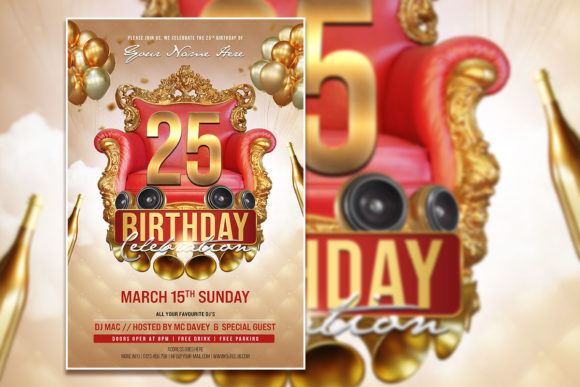
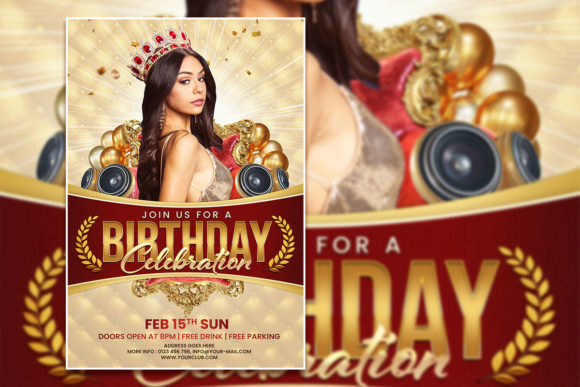
Another consideration is the design style itself. The template is described as a birthday celebration flyer, but the specific aesthetic may not suit every age group or theme. Some users may find the placeholder design too youthful, too minimal, or too ornate for their taste. That is where the editable nature becomes essential. You can adjust colors, reposition text, or replace graphics to better match your vision. However, if the core layout does not align with your event theme, you may spend more time reworking it than you would designing from a simpler base. Assessing the preview image before purchase is always wise.
Usability and Workflow Integration
From a workflow perspective, the template integrates well with standard print and digital pipelines. The 300 dpi resolution meets the requirements of most print services, including online printers that request at least 200 dpi for quality output. The RGB color mode is standard for digital screens, so the flyer will look consistent on phones, tablets, and monitors. If you intend to print, confirming that your printer accepts RGB is straightforward, and many modern print services handle the conversion automatically. For users who need CMYK, converting the file in Photoshop is possible, though it may shift colors slightly.
The organized layer structure mentioned in the product description reduces the risk of accidental edits. When layers are clearly named, you can hide background elements to focus on text placement, or lock layers to prevent movement. This kind of structure is especially helpful when multiple people need to edit the file. For instance, a team member handling the text and another managing the image can work sequentially without confusion.
Long-Term Value and Reusability
The long-term value of a template like this depends on how often you host or promote birthday events. For a parent organizing annual children's parties, a single template can be updated each year with a new photo, age number, and date. For a business running monthly birthday promotions, the template becomes a recurring asset that saves design time. The cost of the download is effectively amortized over each use. After three or four uses, the per-event cost becomes minimal compared to the time saved.
Additionally, having the editable PSD file means you can archive it and revisit it later. If you decide to change your branding colors or update your logo, you can modify the template once and reuse it for future events. That kind of adaptability is rare in one-off design purchases and is a genuine strength of the fully editable format.
Practical Recommendations for Getting the Most Out of This Template
If you decide to use this template, start by reviewing the help file and downloading the recommended font before opening the PSD. Installing the font first ensures that the text renders exactly as intended, saving you the trouble of adjusting spacing later. Next, replace the placeholder photo with your own image at a comparable resolution. A photo that is too small will appear pixelated, while a much larger image may slow down Photoshop. Cropping your photo to roughly match the aspect ratio of the placeholder will give the cleanest result.
Edit all text layers before making non-destructive adjustments like color overlays or drop shadows. Working in a logical order reduces the chance of needing to redo changes. After editing, save a working PSD copy and export a high-quality JPG for sharing. If you plan to print, request a proof from your printer to verify colors before running the full batch.
For digital use, consider creating a square or vertical version for Instagram or Facebook. You can crop the flyer manually or create a new canvas and copy the relevant layers. This extra step takes minutes but significantly expands the template's utility across platforms.
Ultimately, a Birthday Celebration Invitation Template that is fully editable, well-organized, and delivered in a high-resolution PSD format offers a practical solution for anyone who values both quality and efficiency. It respects your time without compromising the visual standard of your event communications. Whether you are a professional organizing a client event, a parent planning a family celebration, or an entrepreneur promoting a special offer, this type of template provides a reliable foundation that you can tailor to your specific needs. The limitations are clear and manageable, and the strengths are directly tied to the real demands of event planning and content creation. For those who already use Photoshop and need a polished birthday flyer quickly, this template is a resource worth having in your toolkit.