Infinotes Google Slide Template for Professional Presentations
Creating a presentation that captures attention and communicates ideas clearly is a challenge many professionals face regularly. The Infinotes Google Slide Template offers a comprehensive solution for anyone who needs to build polished presentations without spending excessive time on design. With 150 total slides spread across five distinct color variations, this template provides a substantial foundation for projects ranging from business pitches to educational content.
What the Infinotes Google Slide Template Offers
This template is built around the idea that preparation should be straightforward and flexible. Each of the five included color variations contains 30 slides, giving you 150 unique layouts to work with. The colors are premade, meaning you do not need to spend time choosing complementary palettes or adjusting hues. You simply select the variation that fits your brand or project tone and start building.
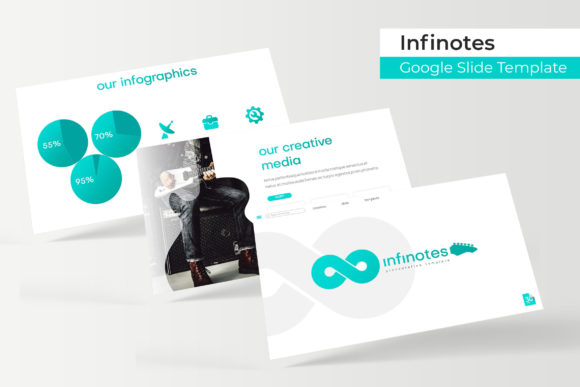
The slide types include handcrafted infographics, section breaks, gallery layouts, and portfolio pages. Infographics are particularly useful when you need to present data or processes in a visually engaging way. Section breaks help your audience transition between topics, which keeps them oriented during longer presentations. Gallery and portfolio slides are ideal for showcasing work samples, team members, or product images.
All graphics are resizable and editable, and picture placeholders allow you to drag and drop images directly into the designated areas. This removes the friction of adjusting image sizes or worrying about aspect ratios. Everything is built on master slides, so changes you make at the master level apply consistently across all related slides.
How Different Professionals Can Use This Template
Marketers often need to present campaign results, strategy proposals, or competitive analyses. The infographic slides in this template make it easier to transform raw data into a format that stakeholders can grasp quickly. Instead of building charts from scratch or trying to fit complex information into plain text slides, you can use the prebuilt visual structures and populate them with your content.
Entrepreneurs and small business owners pitching to investors or partners can benefit from the consistent visual identity that the Infinotes Google Slide Template provides. A well-structured pitch deck with clean section breaks and portfolio slides can make your business case more compelling. The five color variations also give you the flexibility to match your brand colors without needing advanced design skills.
Freelancers and creators who regularly pitch their services or showcase their work will find the gallery and portfolio slides particularly valuable. Whether you are a photographer, designer, writer, or consultant, having a template that lets you present samples professionally can save you hours of preparation before each client meeting. The drag-and-drop picture placeholders make it simple to swap images between projects.
Educators and trainers can use the section breaks and infographic layouts to structure course materials or workshop presentations. When you are covering multiple modules or topics, clear section breaks help learners follow along more easily. The consistent design language also reduces visual distractions, allowing the content to remain the focus.
Bloggers and content creators who produce video tutorials, webinars, or downloadable resources can use this template to create professional-looking slides without needing a dedicated design tool. Since the template is built for Google Slides, you can work from any device with internet access and share your work with collaborators easily.
Practical Benefits That Save Time and Reduce Friction
One of the most practical advantages of the Infinotes Google Slide Template is the amount of preparation time it can save. Starting from a blank slide deck often leads to hours spent on layout decisions, color choices, and formatting adjustments. With 150 prebuilt slides, you can focus on your message instead of the visual framework.
The master slides foundation means consistency is built into the template. When you update a font, color, or element on the master slide, it propagates through all related slides automatically. This is especially useful when you are working on a team presentation where multiple people are contributing slides. Everyone works from the same structure, and the final deck looks cohesive.
Each of the five PPTX files is provided in widescreen format, which is the standard for most modern displays and projectors. You do not need to worry about aspect ratio issues or adjusting slide dimensions after you start adding content. The files are ready to use immediately after download.
The pixel-perfect illustrations included in the template are designed to look sharp on high-resolution screens. This attention to detail matters when you are presenting on large displays or sharing slides digitally where viewers may zoom in. Blurry or low-resolution graphics can undermine the professionalism of your presentation, and this template avoids that problem by starting with high-quality assets.
The inclusion of a readme file with font download links is a thoughtful addition. Instead of guessing which fonts were used or searching for alternatives, you can install the recommended fonts quickly and maintain the intended visual style. The fonts mentioned are free, so there are no additional licensing costs to consider.
Flexibility Across Different Projects
Having five color variations means you are not locked into a single look. You might use one color scheme for internal team presentations and another for external client meetings. Or you might match the color variation to a specific brand or campaign. This flexibility extends the usability of the template beyond a single project.
The five color choices also allow you to test different visual approaches before committing. If you are unsure whether a bold color palette or a softer tone works better for your audience, you can build two versions of the same presentation using different variations and compare them. This is much easier than manually recoloring slides from scratch.
The 30 slides per color variation cover a range of common presentation needs, but you can also mix slides from different variations if you want a custom look. Since the underlying structure is consistent, combining elements from multiple files is straightforward.
What Is Included and What to Expect
When you download the Infinotes Google Slide Template, you receive five PPTX files, each in widescreen format with a premade color scheme. The files are ready to open in Google Slides or Microsoft PowerPoint. A readme file provides information about the recommended fonts and includes download links for the free fonts used in the template.
It is worth noting that the photographs or pictures shown in the preview images are for illustration purposes only. They are not included in the download. This is standard practice for template products, as including stock photography would increase licensing complexity and cost. You will need to supply your own images or use free stock photo sites, which gives you full control over the visuals in your presentation.
The graphics and illustrations included are pixel-perfect and resizable, which means you can adjust them to fit your specific layout without losing quality. The picture placeholders are ready for drag-and-drop image insertion, which simplifies the process of adding your own photos or screenshots.
Who Should Consider This Template
This template is well suited for individuals and teams who create presentations regularly but do not have dedicated design support. If you are a marketer, entrepreneur, educator, freelancer, or small business owner, the time savings and consistency alone can justify the investment. The 150-slide count means you are unlikely to run out of layout options even for longer presentations.
Professionals who present to external audiences, such as clients, investors, or conference attendees, may find the polished look particularly beneficial. A well-designed presentation can influence how your content is received, and starting with a professional template removes a common barrier to quality.
If you are someone who enjoys customizing templates and adding personal touches, the editable graphics and master slides give you room to adapt without starting from scratch. You can adjust colors, reposition elements, and add your own branding while retaining the structural integrity of the template.
For users who work primarily in Google Slides, this template integrates seamlessly into that environment. You can access your work from anywhere, share it with collaborators, and present directly from your browser. The PPTX format also means you can use the template in Microsoft PowerPoint if needed.
Thoughtful Considerations Before Choosing
While the Infinotes Google Slide Template offers substantial value, there are a few factors to consider based on your specific needs. The template provides five predetermined color schemes. If your project requires a very specific or unusual color palette that is not among the five options, you would need to modify one of the existing variations. The graphics are editable, so color adjustments are possible, but this does require some comfort with the editing tools in Google Slides or PowerPoint.
The 150-slide count is generous, but not every slide style or layout may be relevant to your particular project. You may find yourself using a subset of the slides while leaving others unused. This is typical for template-based work, and it is still more efficient than building everything from scratch.
Since the preview images use stock photos for illustration, you need to source your own images. If you do not already have access to suitable photos or graphics, you may need to spend time finding and preparing images before your presentation is complete. This is a normal part of presentation creation, but it is something to factor into your workflow.
The template is built on master slides, which is a standard approach for maintaining consistency. However, if you are not familiar with how master slides work in PowerPoint or Google Slides, there may be a short learning curve when making global changes. The readme file provides guidance, and the basic editing of individual slides remains straightforward.
Making the Most of This Template
To get the best results from the Infinotes Google Slide Template, start by reviewing all five color variations and selecting the one that best matches your project or brand. Then, familiarize yourself with the slide types available. Notice where infographics are placed, where section breaks occur, and how gallery slides are structured. This overview will help you plan your content flow before you begin populating slides.
Use picture placeholders strategically by preparing your images in advance. Crop or resize photos to fit the placeholder dimensions roughly before dragging them in. This reduces the need for manual adjustments later. If you are showcasing multiple projects or team members, gallery and portfolio slides give you a consistent frame for each image.
Take advantage of the section break slides to structure your presentation into clear parts. This is especially useful for longer decks covering multiple topics or phases. Your audience will appreciate the visual cues that signal a shift in focus.
If you need to customize colors beyond the five provided variations, edit the master slides to apply changes across the entire deck. This approach maintains consistency while giving you the flexibility to match a specific brand guideline. The resizable graphics can also be adapted to different proportions or layouts as your content requires.
For team projects, share the template file with collaborators early in the process. Because it is built on master slides, everyone working on the deck will use the same structure and visual standards. This prevents the common problem of mismatched formatting when multiple people contribute slides.
Final Thoughts
The Infinotes Google Slide Template addresses a real need for professionals who want to create high-quality presentations without spending excessive time on design. With 150 slides across five color variations, handcrafted infographics, section breaks, gallery and portfolio layouts, and editable graphics, it provides a solid foundation for a wide range of communication needs. The drag-and-drop picture placeholders and master slides structure reduce friction and help maintain consistency throughout your deck.
Whether you are preparing a pitch for investors, a training module for students, a portfolio for clients, or a report for stakeholders, this template gives you a practical starting point. The five included PPTX files are ready to use in both Google Slides and Microsoft PowerPoint, and the readme file ensures you have access to the recommended fonts. By supplying your own images and customizing the content to your project, you can build a presentation that looks intentional and professional without needing a design background.