Kecho Google Slide Template for Creative Presentations
Putting together a presentation that looks polished without spending hours on design is a goal for many professionals, educators, and creators. The Kecho Google Slide Template offers a structured yet flexible way to achieve that. With 150 total slides spread across five premade color variations—each with 30 slides—this template is built to handle a variety of projects, from business pitches to portfolio showcases. What makes it stand out is the balance between ready-to-use structure and room for customization, especially through master slides, handcrafted infographics, and pixel-perfect illustrations. Whether you are preparing for a client meeting, designing a course module, or building a personal brand deck, understanding how to work with this template can help you get from idea to final product faster while keeping the visuals cohesive and professional.
What the Kecho Google Slide Template Offers
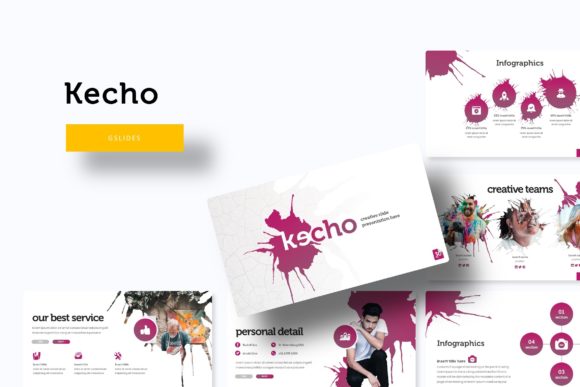
At its core, the Kecho template is a complete presentation system. Each of the five color variations includes 30 slides, giving you a total of 150 unique layouts to work with. The slides are grouped into functional sections: section break slides, gallery and portfolio pages, infographic panels, and various content layouts with picture placeholders. The drag-and-drop picture placeholders make it easy to swap in your own images without breaking the design. Everything is built on master slides, so changes made at the master level apply across the entire deck, saving time when you need to adjust fonts, colors, or spacing.
The template also comes with five separate PPTX files—one for each color scheme—and all are optimized for widescreen format. You get a readme file with instructions and a link to download the free fonts used. The illustrations are pixel-perfect and fully resizable, meaning they stay sharp whether you present on a large screen or export as PDFs. The handcrafted infographics give you a head start when visualizing data, timelines, or processes. All photographs shown in the preview are for illustration only and are not included, so you will need to supply your own images. That is actually an advantage because it forces your visuals to be unique and relevant to your message.
Creative Possibilities and Practical Applications
Because the Kecho template covers such a wide range of slide types, it can be adapted for many different contexts. Below are several ways different users can make the most of it.
For Marketers and Brand Managers
Marketers often need to present campaign strategies, performance data, or creative concepts to stakeholders. The infographic slides are particularly useful here. You can take the handcrafted diagrams and customize them with your own metrics, turning raw numbers into a story that is easy to follow. The section break slides also help structure long presentations by visually separating topics like objectives, tactics, results, and next steps. Use the gallery slides to showcase mockups, ad creatives, or case study results in a clean grid layout. The multiple color variations let you match the deck to your brand colors or the campaign theme—just pick the PPTX file that comes closest and make minor adjustments.
For Designers and Creative Freelancers
Designers frequently need portfolio decks to present work to potential clients. The Kecho template’s portfolio and gallery slides are built for exactly this. The picture placeholders allow you to drop in screenshots, photos, or mockups, while the consistent spacing keeps the layout professional. The master slide structure means you can change the background color or font across all slides in seconds, which is helpful when you want to test different moods for your portfolio. The pixel-perfect illustrations add a polished touch to section titles or divider pages without looking generic. Since the template is also provided in PPTX format, you can start working in PowerPoint and later import into Google Slides if needed—the compatibility is smooth as long as you check fonts and animations.
For Educators and Course Creators
Teaching materials need clarity and visual consistency. The Kecho template helps create lecture slides, workshop decks, or online course presentations. The infographics can explain complex concepts step by step, and the section breaks can separate modules or chapters. The resizable graphics mean you can enlarge diagrams for detailed explanations without losing quality. For educators who share slides with students, the clean design and readable fonts (using the free fonts provided) improve accessibility. You can also duplicate slides and modify them for different lesson topics while keeping the same visual language, which builds recognition and makes navigation easier for learners.
For Entrepreneurs and Small Business Owners
When pitching to investors, partners, or customers, you need a deck that feels both credible and visually engaging. The Kecho template provides a solid framework for pitch decks: use the infographics for market data, the gallery slides for product images or team photos, and the content slides for business model breakdowns. The five color variations let you choose a scheme that aligns with your brand identity—cool blues for a tech startup, warm tones for a lifestyle brand, or neutral shades for a consulting firm. Because the template is built on master slides, you can quickly update the entire deck if your branding changes, making it reusable across different funding rounds or product launches.
How to Keep Results Clear, Effective, and Organized
Even with a well-designed template, the final quality depends on how you use it. Focus on one color variation per deck to maintain consistency. Avoid mixing elements from different color files unless you intentionally want a multicolor style—and if you do, use master slides to standardize accents. Take advantage of the picture placeholders by using high-resolution images that relate directly to the content. Blurry or unrelated photos will weaken the professional look.
Use the section break slides strategically. They are more than separators; they give your audience mental breaks and signal transitions. Place one before each new major topic. For the infographic slides, do not overload them with data. Pick one or two key statistics per slide and use the diagram format to highlight the relationship or trend. The handcrafted shapes are meant to simplify, not complicate—keep your text minimal and let the visuals carry the message.
When customizing fonts, always use the fonts provided or choose a free alternative that matches the aesthetic. The readme file includes the download links, so follow those to maintain the intended proportions. If you plan to present on a different platform (like Google Slides), test the font rendering ahead of time to avoid substitution issues.
Adapting the Template for Different Formats and Platforms
The Kecho template is delivered as PPTX files, which are compatible with both Microsoft PowerPoint and Google Slides. For Google Slides users, upload the PPTX file and then edit in the browser. Most features transfer well, especially if you keep the design simple—avoid complex animations that may not translate. The widescreen format (16:9) works on modern displays, projectors, and video conferencing tools.
You can also adapt the slides for other formats. Export specific slides as high-resolution images for social media posts, or convert the deck to PDF for a printable handout. The resizable graphics and pixel-perfect illustrations ensure that exported images maintain crisp edges. For a website portfolio, you might pull the gallery slide design and recreate it in HTML/CSS using the template as a visual reference. The clean grid layout and consistent spacing make it a solid starting point for web design too.
Practical Inspiration for Your Next Project
Think beyond the standard business presentation. Use the Kecho template to create a visual proposal for a creative concept, a mood board for a design project, or a year-in-review document for your team. The section breaks can serve as chapter openers in a longer report, and the infographics can replace bullet lists in process explanations. The portfolio slides are ideal for a photographer’s client preview, an architect’s project archive, or a writer’s published work showcase.
Because you have five color variations, try splitting a large deck into multiple parts with different colors to represent different phases or departments. For example, use one color for the analysis section, another for the strategy, and a third for execution. This color coding helps audiences mentally categorize information.
Remember that the photos in the preview are placeholders—your own images will make the presentation original. Use this as an opportunity to incorporate personal photography, branded visuals, or custom illustrations. The template provides the container; your content fills it with meaning.
Making the Most of the Included Files
The package includes five PPTX files, a readme document, and a font download link. Start by opening the color variation that matches your brand or mood. Read the readme file first—it usually contains tips for using the template, font installation instructions, and notes about image placeholders. Install the recommended fonts before editing to avoid layout shifts. Duplicate the file if you want to experiment with different color combinations across projects. The master slides are your best friend: adjust the color scheme, background, and default text styles there, and they will cascade through all 30 slides. This saves time and ensures consistency.
If you need more than 30 slides, simply duplicate existing ones. The clean layout means extra slides can slot in without breaking the flow. For longer presentations, use the section break slides regularly to maintain pace. With 150 total slides across all color sets, you have plenty of starting points—mix and match layouts from different files if you want, but be consistent with fonts and image treatment to avoid a mismatched look.
Final Thoughts on Using Kecho Google Slide Template
The Kecho Google Slide Template is a versatile resource that balances structure with creative freedom. By understanding its components—master slides, infographics, section breaks, gallery slides, and pixel-perfect graphics—you can adapt it to nearly any presentation need. Marketers, designers, educators, and entrepreneurs all benefit from its prebuilt consistency and easy customization. Focus on clear content, strong imagery, and purposeful layout choices, and the template will elevate your work without overpowering it. Whether you are building a pitch deck from scratch or refreshing an existing presentation, the Kecho template gives you a solid foundation to produce results that look intentional and professional.