Building Better Presentations with the Sasti Keynote Template
Creating a presentation that communicates clearly and looks professional often takes more time than expected. Even experienced presenters can spend hours adjusting slide layouts, aligning graphics, and choosing colors. The Sasti Keynote Template offers a structured alternative that streamlines this process. Designed with a complete set of 150 slides across five color variations, this template package gives you a consistent visual framework for any project. Whether you work on client pitches, internal reports, educational content, or marketing proposals, the templates reduce friction between your ideas and the final presentation deck.
Understanding the Structure of the Sasti Keynote Template
The Sasti Keynote Template is not a single file but a collection of five distinct Keynote presentations. Each file contains 30 slides based on a unique color variation. That means you get a total of 150 ready-to-use slides, each crafted around a cohesive palette. This structure allows you to choose a color scheme that fits your brand identity or the mood of your project without having to modify the entire deck manually.
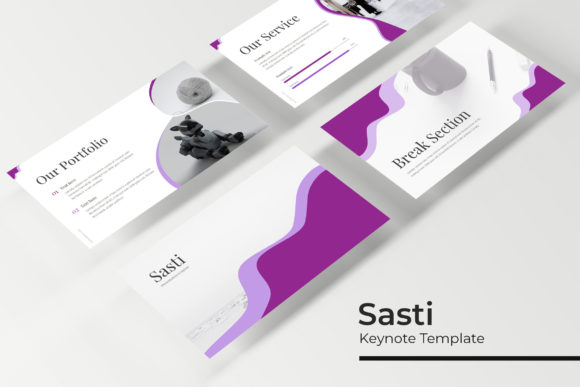
Within each template, you will find specific slide types that serve different stages of a presentation workflow. Section break slides help you transition between topics clearly. Gallery and portfolio slides provide space for showcasing work, images, or case studies. Handcrafted infographic slides let you present data or processes visually without building custom graphics from scratch. Every element is built using pixel-perfect illustrations, which means the slides render crisply on both standard and high-resolution displays.
Because the templates are based on Master Slides, any change you make to a master layout automatically updates all slides using that layout. This feature is particularly useful when you need to adjust fonts, colors, or positioning across an entire deck. It also reduces the risk of inconsistent formatting when multiple people collaborate on the same file.
How the Sasti Keynote Template Fits into Your Workflow
Incorporating this template into your presentation process is straightforward. You can use it at the planning stage to outline your narrative, during development to structure content, or after your initial draft to polish the visual look. The flexibility of having multiple color variations and slide types makes the template suitable for both early brainstorming and final delivery.
Before You Start: Preparation and Planning
When you are about to create a presentation, the first decision is often about the visual direction. Instead of starting with a blank canvas and spending time on color theory, you can open the Sasti Keynote Template and browse its five premade colors. Each color variation already has a complete set of slides. This saves you the effort of deciding which shades work together for headings, backgrounds, charts, and icons.
During the planning phase, you can use the section break slides to define the major chapters of your talk. Mapping your content to these breakpoints helps you see the overall flow before you fill in the details. The gallery and portfolio slides are also useful at this stage if you need to allocate space for visual examples early in your outline.
Another practical step at this stage is to review the included Readme file. It contains the font details and a link to download the free fonts used in the template. Installing the fonts before you start editing prevents layout shifts later. This is a small preparation step that saves time and frustration when you are deep in the editing process.
During Development: Building the Deck Efficiently
Once you have your outline ready, the actual slide creation goes much faster with the Sasti Keynote Template. Because the slides come with picture placeholders, you can simply drag and drop your images into the designated frames. The placeholders are already sized and positioned, so you do not need to adjust cropping or alignment manually. This drag-and-drop functionality works well when you are processing many images quickly, such as when assembling a portfolio or a project gallery.
The handcrafted infographic slides are another time-saving element. Instead of building charts and diagrams from scratch, you can edit the provided infographic layouts with your own data. These slides cover common needs such as timelines, process flows, percentage breakdowns, and comparison tables. Because they are resizable and editable graphics, you can adjust the size or shape of individual elements to match the amount of content you have. This is especially helpful when you need to fit additional text or data points without breaking the visual balance.
For teams, the master slide structure becomes a valuable consistency tool. If a colleague creates a new slide or modifies an existing one, the underlying master ensures that fonts, colors, and spacing remain uniform. You can also share the template file with team members and ask them to edit only the content, keeping the design intact. This reduces the back-and-forth over minor formatting issues during the final review.
After Completion: Finalization and Export
When your slides are complete, the Sasti Keynote Template still supports your workflow during final checks. You can review the entire deck and adjust the master slide if you need to change a global element like a footer or logo. Because the template uses master slides, one edit propagates across all slides, saving you from repetitive manual updates.
If you need to share a preview with a client or stakeholder who uses PowerPoint, note that the package includes PowerPoint-compatible files. The templates are provided as Keynote files, but you can export them to PowerPoint format while retaining the visual structure. The design elements, including the infographics and picture placeholders, transfer well when you use the standard export options. This compatibility makes the template useful in mixed-environment teams where some members rely on Keynote and others on PowerPoint.
Also, keep in mind that the photographs shown in the preview images are for illustration only. You will need to replace these with your own image assets. Plan your image sourcing early so that the picture placeholders are filled with relevant visuals, not placeholder content, when you present or share the final deck.
Practical Implementation Tips
To get the most out of the Sasti Keynote Template, consider a few workflow strategies that match how you actually use presentations.
Start with the right color variation. Decide early which of the five premade colors matches your brand or project theme. You can switch colors later, but changing midway may require adjusting some slide elements. If you are uncertain, choose a neutral variation first and then apply your brand palette after the content is set.
Use the section break slides as anchor points. Place these slides at natural transitions in your narrative, such as moving from background to methodology or from analysis to recommendations. They give the audience a mental pause and make your presentation easier to follow. Because the section break slides are visually distinct from content slides, they also add rhythm to the deck.
Edit infographics in context. When you modify an infographic slide, keep the surrounding slides visible so that the visual style remains consistent. The infographics are designed to match the template colors, so changing a color on one slide may need to be replicated on others. Using the master slide approach can help you apply these changes uniformly.
Take advantage of resizable graphics. The graphic elements in the template can be scaled up or down without losing quality. This flexibility is useful when you need to combine multiple graphics on a single slide or adjust the visual emphasis of a particular element. Experiment with scaling to create custom layouts that still align with the template design.
Maintain a clean asset library. Because the template relies on picture placeholders, keep your images organized in folders before you begin. Name your files clearly so that drag and drop is fast and you can find the right image for the right placeholder. This habit speeds up the assembly process and reduces errors.
Long-Term Use and Consistency
The Sasti Keynote Template is designed for repeated use across multiple projects. Because you get five complete color variations, you can assign different colors to different types of presentations, such as internal reports in one color and client pitches in another. Over time, your team can build a library of presentations that all follow the same structural pattern, which makes collaboration and handoffs smoother.
Since the templates are pixel-perfect and based on master slides, they also maintain visual quality across various output formats, whether you present on a large screen, share a PDF, or embed slides into a web page. This consistency reduces the need to rework slides for different distribution channels.
If you are a freelancer or small business owner, having a single template system that covers section breaks, infographics, galleries, and portfolio pages means fewer design assets to manage. You can focus your creative energy on content and messaging rather than slide construction. For educators and bloggers who produce regular visual content, the template offers a repeatable process that speeds up production while keeping a professional standard.
Compatibility and Integration with Other Tools
The Sasti Keynote Template works within the Apple Keynote environment, but its design is built with cross-platform use in mind. The included PPTX files allow you to open the presentations in Microsoft PowerPoint or Google Slides if needed. This compatibility is helpful when you work with clients who prefer different tools or when you need to submit files in a specific format.
The resizable and editable graphics can also be exported as images or vectors for use outside of presentations. For instance, you might reuse an infographic layout in a document or on a landing page. Because the graphs and icons are based on standard shapes, they can be copied into other applications with minimal loss of quality.
When integrating the template with your existing workflow, consider pairing it with project management or collaboration tools. You can store the template files in a shared cloud folder and maintain a version that everyone on your team accesses. This ensures that all presentations start from the same baseline, which is particularly useful in agencies or marketing departments where multiple people produce decks regularly.
Final Observations
The Sasti Keynote Template is a practical resource for anyone who needs to produce polished presentations without starting from scratch each time. Its 150-slide structure across five color variations gives you flexibility while maintaining consistency. The inclusion of infographics, section breaks, gallery slides, and portfolio pages covers a wide range of common presentation needs. By focusing on master slides and editable graphics, the template supports both individual creators and collaborative teams.
To integrate it smoothly into your routine, start by selecting the right color variation, use section breaks to organize your narrative, and rely on the picture placeholders for quick image insertion. Plan your fonts and image assets before editing to avoid interruptions, and leverage the master slide structure for global changes during finalization. With these practices, the template becomes a reliable part of your presentation workflow, freeing you to focus on the content that matters to your audience.