Building Professional Presentations with the Maze Keynote Template
A Deep Dive into a Versatile Presentation System
Creating a compelling presentation often feels like a balancing act between design quality, time constraints, and technical flexibility. Many professionals find themselves stuck between using a basic template that looks generic or spending hours customizing every slide from scratch. The Maze Keynote Template addresses this gap by offering a structured yet adaptable system built around 150 total slides, organized into 5 premade colors with 30 slides for each template. This structure gives you five complete presentation decks in a single purchase, each with its own color identity, which significantly reduces the time needed to build a coherent visual narrative.
Rather than providing a single set of slides, this template offers multiple starting points. Each of the 5 color variations acts as a complete theme, so you are not limited to one look. If you are pitching to a conservative corporate client, you might choose a muted palette. For a creative portfolio review, a bolder variation works better. The Maze Keynote Template is designed to accommodate different contexts without requiring you to rebuild slides from the ground up.
Understanding the Slide Architecture and Structure
The sheer volume of slides in this template can initially feel overwhelming, but the organization is logical once you examine how the decks are built. Each of the 5 premade colors includes a full set of 30 slides, covering everything from title slides and section breaks to content layouts, portfolios, and galleries. This means you are not hunting for missing layouts or improvising when you need a specific slide type. The template is comprehensive enough to handle most presentation needs without external additions.
Section Break Slides as Transition Tools
One often overlooked element in presentation design is the section break slide. These slides act as visual pauses, signaling to your audience that you are moving to a new topic or phase of the presentation. The Maze Keynote Template includes dedicated section break slides that are distinct from your content slides, using different typography treatments, color blocks, or graphic elements to create a clear separation. This is particularly useful in longer presentations where you want to avoid monotony. For example, if you are presenting a quarterly business review that covers marketing, sales, and product development, section breaks help the audience mentally reset before each segment.
Gallery and Portfolio Slides for Visual Storytelling
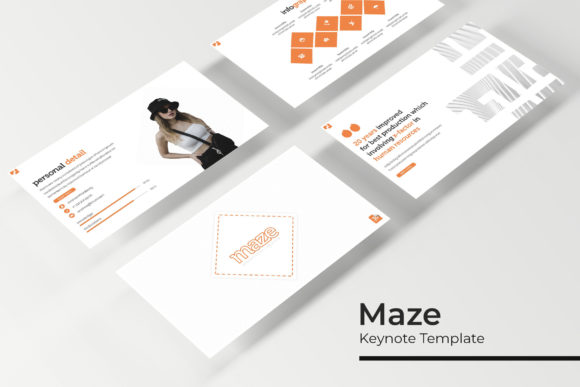
Another standout feature is the inclusion of gallery and portfolio slides. These layouts are specifically designed to showcase images, screenshots, or project samples in a grid or masonry style. If you work in creative fields like graphic design, photography, architecture, or product design, these slides allow you to present your work without cramming multiple images into a single, awkward layout. The Maze Keynote Template handles the spacing, alignment, and consistency, so your portfolio looks intentional rather than thrown together. The picture placeholders make it simple to drag and drop your images, and because the layouts are built on master slides, any changes you make to the master will propagate across all slides using that layout.
Handcrafted Infographics and Data Visualization
Presenting data in a way that is both accurate and visually engaging is a challenge many presenters face. Raw charts from spreadsheet software often look out of place in a polished presentation. The Maze Keynote Template addresses this with handcrafted infographics that are built directly into the slide decks. These are not generic vector graphics pulled from a free repository. They are designed to align with the overall aesthetic of the template, using consistent colors, fonts, and iconography.
These infographics cover common data presentation needs such as process flows, timelines, comparison charts, percentages, and hierarchical structures. Because they are resizable and editable graphics, you can adapt them to your specific data points without losing visual quality. You have likely encountered templates where resizing a chart causes text to overlap or icons to distort. That is less of a concern here, as the illustrations are built with vector precision. The pixel-perfect illustrations ensure that whether you present on a laptop screen, a large monitor, or a projection system, the graphics remain crisp.
Working with Master Slides and Placeholder Systems
One of the more technical but highly valuable aspects of the Maze Keynote Template is its reliance on master slides. If you are familiar with Keynote, you know that master slides are the backbone of any well-structured presentation. They define the layout, background, font styles, and placeholder positions for all slides that inherit from them. This template takes full advantage of that system, meaning you can make global changes in seconds.
For instance, if you decide midway through building your presentation that you want to change the accent color or move a logo position, you do not need to edit every slide individually. You adjust the master slide, and all linked slides update automatically. This is a significant time saver, especially for larger presentations that approach the 30 slides per template maximum. The picture placeholders follow the same logic. They are pre-positioned and formatted, so you simply drag and drop your image into the placeholder, and it crops and scales to fit perfectly. No manual resizing, no alignment guessing.
Color Variations and Practical Applications
The 5 premade colors included in the Maze Keynote Template are not random. They are chosen to cover a spectrum of use cases. Typically, you will find a professional dark theme suitable for evening events or luxury brands, a clean light theme for corporate boardrooms, a vibrant theme for creative agencies, a muted earth tone for sustainability or lifestyle presentations, and a bold accent theme for marketing pitches. This range means you can start with a color variation that closely matches your brand or project, and then fine-tune as needed.
Consider a scenario where you are preparing a pitch for a technology startup. You might choose the dark theme with neon accents to convey innovation and modernity. For a medical conference, the clean light theme with minimal distractions would be more appropriate. The flexibility of having five distinct starting points reduces the friction of adapting a single template to vastly different audiences. You are not forcing a dark, edgy design into a conservative healthcare setting. You simply pick the variation that fits.
Resizability and Editable Graphics in Practice
A common pain point in presentation design is the inability to resize graphics without breaking the layout. Many templates lock elements or use raster images that pixelate when scaled. The Maze Keynote Template uses pixel-perfect illustrations that are vector-based, meaning they scale infinitely without quality loss. You can enlarge an icon to fill a slide background or shrink a chart to fit into a smaller layout, and the integrity of the graphic remains intact.
This is particularly relevant when you are adapting the template for different screen ratios. The 5 PPTX Widescreen files ensure that you have a version optimized for modern displays, but you can also adjust elements within those slides. The resizable and editable graphics give you control over every component. You can change colors, adjust line thickness, replace icons, or modify text without worrying about breaking the design. This level of editability is what separates a professional template from a static one.
What You Actually Get in the Package
Understanding what is included in the Maze Keynote Template helps set realistic expectations. The package contains 5 PPTX files, each representing one of the 5 premade colors. Additionally, you receive 5 PPTX Widescreen files, which are the same templates formatted for 16:9 aspect ratio, the standard for most modern projectors and monitors. This dual format ensures compatibility whether you are presenting on a laptop, a large display, or through a video conferencing platform.
The package also includes a Readme First document. This is worth reading before you start editing, as it contains instructions on how to use the template effectively, including tips on font installation and slide management. The fonts used in the design are not embedded due to licensing restrictions, but a free font download link is provided. You will need to install these fonts on your system for the slides to render correctly. This is a standard practice for premium templates and avoids legal issues with font distribution.
It is also important to note that all photographs or pictures used in the preview are not included. They are intended for illustration purposes only. The template provides the layout structures and placeholders, but you supply the actual images. This is actually an advantage because you can use your own photography, stock assets, or client images without being locked into someone else's visual choices. The picture placeholders are designed to accept your images cleanly, so you maintain full control over the final visual output.
Practical Recommendations for Users
If you are considering the Maze Keynote Template for your next project, there are a few practical steps that will help you get the most out of it. First, take time to review all five color variations before committing to one. Open each 5 PPTX files and scroll through the 30 slides to see how different colors affect the mood of the presentation. You might find that a variation you initially overlooked actually fits your content better.
Second, spend some time exploring the master slides. Understanding how the template is structured at the master level will allow you to make global changes efficiently. If you need to adjust the font family across all slides, doing it once on the master saves you from editing each slide individually. The same applies to colors, background elements, and placeholder positions.
Third, when adding your own images, use the picture placeholders rather than inserting images directly onto the slide. The placeholders are pre-sized and positioned to maintain the design balance. Dragging and dropping images into these placeholders ensures consistent spacing and alignment across your entire deck. This is especially important for gallery and portfolio slides where multiple images need to work together visually.
Fourth, if you plan to use the handcrafted infographics, take the time to customize the data rather than leaving the placeholder text and numbers. A template feels polished when the data is specific to your project. The infographics are editable, so change the labels, percentages, and values to match your actual information. This attention to detail is what makes a presentation feel custom rather than off-the-shelf.
Adapting to Modern Workflows and Industries
The Maze Keynote Template fits into modern workflows across multiple industries. For marketing professionals, the gallery and portfolio slides are ideal for case studies and campaign recaps. For consultants, the section breaks and infographics help structure complex recommendations in an easy-to-follow format. For educators and trainers, the clean layouts and consistent color coding improve comprehension and retention. For entrepreneurs pitching to investors, the polished design communicates professionalism and attention to detail.
The template also works well in collaborative environments. Because it uses standard PPTX files, team members can share and edit slides without compatibility issues. The master slides structure ensures that even if multiple people contribute slides, the overall design remains consistent. This is particularly useful in agencies where different team members may be responsible for different sections of a proposal or pitch deck.
In remote work settings, the 5 PPTX Widescreen format is especially relevant. Most video conferencing platforms display presentations in 16:9, and having a template that is already optimized for that ratio means your slides will fill the screen correctly without black bars or cropping issues. The pixel-perfect illustrations also translate well across different screen resolutions, from laptops to tablets to external monitors.
Final Observations on Template Quality
What makes the Maze Keynote Template stand out is not just the number of slides, but the thoughtfulness behind the design system. The 5 premade colors are not just palette swaps; each variation comes with its own set of 30 slides that are fully constructed, not simply recolored versions of the same layout. The handcrafted infographics are integrated into the flow of the deck rather than tacked on as an afterthought. The resizable and editable graphics give you real control over the final look, and the master slides structure makes that control efficient rather than labor-intensive.
For anyone who regularly creates presentations, investing time in a template like this pays off in consistency and speed. You avoid the common pitfalls of disjointed slide designs, inconsistent spacing, and mismatched colors. Instead, you get a cohesive system that lets you focus on your content while maintaining a high standard of visual presentation. The Maze Keynote Template is designed to be used, reused, and adapted, making it a practical tool for anyone who wants their presentations to look intentional and professional without spending days on design.