Deont Keynote Template: A Practical Review of Its Features and Fit for Your Presentations
Choosing the right presentation template often feels like a tradeoff between visual quality, flexibility, and the sheer time you have to build something from scratch. The Deont Keynote Template enters this space as a substantial option, offering 150 total slides across five distinct color variations. But a large slide count alone does not guarantee a good fit for every project. Understanding what this template actually includes, how it compares to building a presentation manually, and where its strengths and limitations lie can help you decide whether it deserves a spot in your workflow.
At its core, Deont is a comprehensive Keynote template bundle designed for users who need a polished, cohesive presentation without starting from a blank canvas. Each of the five color variations contains 30 slides, giving you a full deck that you can adapt to your content. The bundle also includes five PPTX files for PowerPoint users, making it platform-agnostic for teams that work across both Keynote and PowerPoint environments. The inclusion of handcrafted infographics, section break slides, gallery and portfolio layouts, and resizable graphics means this is not just a collection of generic slides — it is a structured toolkit aimed at reducing production time while maintaining a professional look.
Understanding the Structure: 150 Slides Across Five Color Variations
One of the first things to evaluate in any presentation template is how much actual work the slide library saves you. With Deont, you get 150 slides total, organized into five separate template files. Each file features a different premade color scheme, so you are not locked into a single palette. This structure matters because different audiences, brands, or presentation contexts often call for different visual tones. A corporate quarterly review might demand a restrained navy-and-white scheme, while a creative agency pitch could benefit from a warmer or more saturated palette. Having five distinct color options within one purchase allows you to match the tone of your content without needing to manually recolor every slide.
Each color variation includes 30 slides, which for most presentations is more than sufficient. A typical business deck, investor pitch, or conference talk runs between 15 and 25 slides, so you have room to select the layouts that fit your narrative and leave out the ones that do not. The 30-slide count per theme also means you can build a complete deck from one file without needing to pull slides from multiple sources, which simplifies file management and ensures visual consistency.
Compared to using a generic template with only one color option, the five-variation approach gives you flexibility without requiring advanced design skills. If you have ever spent hours manually recoloring a template only to find that some elements do not update cleanly, you will appreciate having ready-to-use alternatives that are tested and cohesive. That said, if your brand uses a very specific color that is not represented in the five provided schemes, you may still need to adjust elements manually. The template is resizable and editable, so customization is possible, but the out-of-the-box experience is best when one of the five palettes aligns closely with your needs.
Design Quality and Production Value
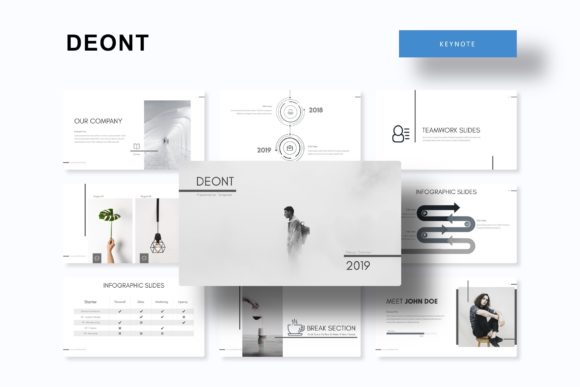
The Deont template positions itself with handcrafted infographics and pixel-perfect illustrations. This design vocabulary matters because presentation templates vary widely in visual quality. Some templates rely on generic icons and basic shapes that feel dated or impersonal. Deont appears to invest in bespoke graphic elements, which can elevate a deck from looking like a fill-in-the-blanks exercise to something that feels intentionally designed.
The inclusion of drag-and-drop picture placeholders is a practical feature for anyone who needs to add photos or screenshots regularly. Instead of resizing and cropping images manually, you can drop them into pre-set frames that maintain consistent proportions across slides. This not only speeds up your workflow but also ensures that image-based slides, such as portfolio pages or team member profiles, have a uniform look. For professionals who present regularly — consultants, marketers, creative directors, or startup founders — this kind of efficiency adds up over time.
Another structural advantage is that the template is built on Master Slides. When you edit a master slide, changes propagate across all slides that use that layout. This is a significant time saver if you need to adjust a font, reposition a logo, or tweak a color globally. Templates that lack master slide support often require you to edit each slide individually, which is error-prone and slow. Deont’s reliance on master slides means that after you set up your branding once, the rest of the deck follows suit automatically.
However, it is worth noting that the preview images use stock photographs for illustration purposes only. The actual template does not include these photos. This is standard practice in the template industry, but it is a limitation to keep in mind. When you purchase Deont, you are buying the slide layouts, graphics, infographics, and design framework — not the imagery shown in the demo. You will need to supply your own photographs or purchase licenses for stock images separately. If you are planning a highly image-driven presentation, factor in the time and cost of sourcing those visuals.
Practical Workflow Considerations
From a file compatibility standpoint, Deont covers both Keynote and PowerPoint users. The bundle includes five PPTX files in widescreen format, plus the Keynote versions. This dual-format approach is helpful for teams that collaborate across macOS and Windows, or for individuals who need to deliver a presentation on a system where only PowerPoint is available. The widescreen format is the modern standard for most projectors and screens, so you are unlikely to run into aspect ratio issues.
The inclusion of a Readme file and a free font download link is a small but important detail. Font licensing can be a hidden obstacle when using premium templates. If a template relies on a paid font that you do not own, you either have to purchase it or substitute a different font — and substitutions can break a layout. Deont provides a link to download the recommended fonts for free, which removes that friction and keeps your presentation looking as intended.
For users who are not design-savvy, the handcrafted infographics are a notable strength. Building clear, data-driven graphics from scratch requires both skill and time. Having pre-built infographic elements that you can populate with your own numbers means you can present data visually without needing to learn diagramming software or custom illustration techniques. This is especially valuable for internal reports, annual reviews, or educational content where clarity and professionalism matter more than artistic flair.
Who Benefits Most from This Template
Deont Keynote Template is a strong fit for professionals who need to produce polished presentations on a regular cadence and want to avoid the inefficiency of starting from scratch each time. If you are a consultant preparing client decks, a marketing manager building campaign presentations, or a creative professional maintaining a portfolio, the combination of varied color schemes, editable graphics, and master slide support aligns well with your workflow.
The gallery and portfolio slides are particularly useful for photographers, designers, architects, and agencies that need to showcase visual work. The slide layouts are designed to present images cleanly without competing with heavy text or decorative elements. For someone who needs to pitch work to clients or present a body of projects at a conference, having dedicated portfolio layouts saves the effort of designing those pages from the ground up.
Similarly, the section break slides help structure longer presentations into clear segments. If you often deliver talks that last thirty minutes or more, section breaks give your audience visual cues that a new topic is beginning. This improves comprehension and keeps your narrative organized. For training sessions, educational seminars, or multi-part business reviews, this structural support is genuinely useful.
Limitations and When to Look Elsewhere
No single template works perfectly for every use case, and Deont is no exception. If your presentation requires heavy data visualization — such as complex charts, interactive dashboards, or real-time data feeds — a standard slide template may not be the best starting point. The handcrafted infographics in Deont are designed for static, readable data displays, not for live or highly customized analytics. For data-heavy presentations, you might need to supplement the template with external charting tools or consider a specialized dashboard template.
Another consideration is brand adherence. If your organization has strict brand guidelines with specific color codes, typography rules, and logo placement requirements, you will need to invest time customizing any template, including Deont. The five color schemes provide a good starting point, but they may not match your exact brand palette. The editable nature of the template means you can make those changes, but it requires comfort with Master Slides and a willingness to do some manual adjustment.
For users who need a template that includes licensed photography, icons, or illustrations ready for commercial use, Deont’s policy of not including preview images means you will need to source your own assets. If you are short on time and want a template that comes with a complete visual library, you may want to look for options that include royalty-free images as part of the package.
Finally, if you only need a small presentation — say, ten slides for a quick internal update — purchasing a 150-slide template bundle may feel like more than you need. While you can certainly use only the slides you want, the cost and file size may not be justified for very small or infrequent projects. In those cases, a simpler, smaller template might be a more practical investment.
Making the Final Decision
When evaluating whether Deont Keynote Template is the right choice, consider the kind of presentations you build most often, how much time you typically spend on design, and whether the five color variations align with your clients or brand. If you regularly produce decks that require a professional appearance, varied visual elements, and efficient workflow, the bundle offers genuine value. The handcrafted infographics, master slide architecture, and drag-and-drop placeholders reduce the gap between a generic template and a custom-built presentation.
On the other hand, if your presentations are highly specialized — data-heavy, brand-restricted, or reliant on unique imagery — you may need to supplement the template with additional resources or consider a more tailored solution. The five PPTX files and Keynote compatibility make it versatile, but the absence of included photographs means you should budget time for image sourcing.
At its price point and feature set, Deont sits in a practical middle ground. It is not a one-click solution that works for every scenario, but it is a well-structured toolkit that can save hours of design work for users who need consistent, high-quality results. Understanding what it includes — and what it does not — allows you to make an informed choice that fits your actual workflow rather than being swayed by slide count or visual flair alone.
For professionals who value efficiency, structure, and the ability to adapt a template to different contexts, the Deont Keynote Template is worth considering. Just go in with a clear picture of your own requirements, and you will know whether it is the right fit or a stepping stone to something more customized.