Imme Google Slide Template: A Practical Review of Its Design, Flexibility, and Real-World Use Cases
Presentation templates can feel like a gamble. Some are visually striking but rigid, forcing your content into predefined boxes. Others offer flexibility but lack the polish that keeps an audience engaged. The Imme Google Slide Template sits in a middle ground that many presenters find useful. It brings together structured design, color variation, and modular slide types without locking you into a single aesthetic. This article walks through what the Imme Google Slide Template actually offers, how it compares with other approaches to building slide decks, and when it might fit your workflow.
What the Imme Google Slide Template Offers
At its core, the Imme Google Slide Template is a collection of 150 total slides distributed across five premade color variations. Each variation contains 30 slides, which means you are not stuck with one color scheme from start to finish. If your pitch deck, client report, or internal presentation needs to align with brand guidelines or simply benefit from a change in tone, you can switch to a different color set without rebuilding your slides.
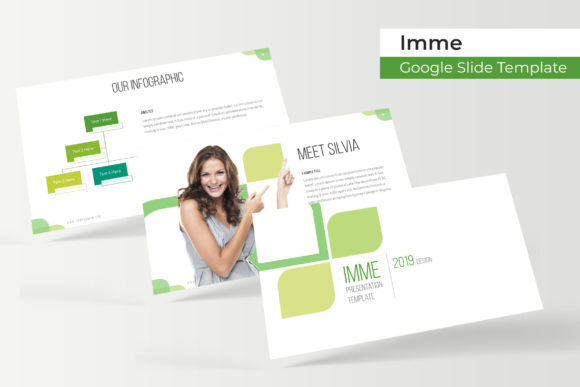
The template is built around handcrafted infographics, section break slides, gallery and portfolio layouts, and resizable, editable graphics. Picture placeholders use a drag-and-drop approach, which reduces the time spent aligning images manually. Everything is based on master slides, so changes made at the master level propagate consistently across the deck. The illustrations are described as pixel-perfect, meaning they hold up well on high-resolution screens and projectors.
What comes in the package? You get five PPTX files, each in widescreen format, plus a readme file that includes links to the free fonts used. Notably, photographs shown in previews are not included. They serve only as visual examples. This is a common practice, but worth noting if you expect a library of stock images alongside the template.
How Imme Compares with Other Slide Deck Options
When evaluating presentation templates, the main alternatives tend to fall into three categories: minimalist templates that emphasize whitespace, feature-rich templates with heavy graphical elements, and custom-designed decks built from scratch. The Imme Google Slide Template leans toward the feature-rich side but avoids becoming overwhelming.
Compared to minimalist templates, Imme offers more visual structure. The handcrafted infographics and section breaks give you built-in ways to highlight data, signal transitions, and create visual rhythm. If your content is text-heavy and you prefer a clean, open layout, a minimalist approach might serve you better. But if your material includes statistics, process flows, timelines, or portfolio imagery, Imme gives you ready-made containers that save design time.
Compared to fully custom decks, Imme provides a faster starting point. A custom deck designed from scratch can take hours or days depending on the level of polish required. With Imme, you begin with a professional layout and then swap in your own text, images, and brand colors. The tradeoff is that you are working within the templates prebuilt structure. While the slides are resizable and editable, the overall layout framework is fixed. If you need a completely unique visual language that breaks away from grid-based slide design, a custom approach may be more suitable.
Another common alternative is using a general-purpose PowerPoint or Google Slides theme that comes with the software. These are usually free but limited in variety. The Imme Google Slide Template offers more slide types, multiple color variations, and design details that go beyond what default themes provide. For someone who presents regularly and wants a consistent look without reinventing the deck each time, this can be a practical upgrade.
Color Variation Without Redundancy
One of the more thoughtful aspects of this template is the five premade color sets. Each set contains 30 slides, but the layouts are not identical across all five. Instead, you get variety in how the same slide types are rendered across different color palettes. This matters when you are presenting to different audiences. A boardroom presentation might call for muted, professional tones, while a creative pitch could benefit from bolder hues. Having both options available within the same template family keeps your branding coherent while allowing tonal flexibility.
Handcrafted Infographics and Section Breaks
Infographics are often the hardest part of a presentation to get right. Poorly designed charts and diagrams can confuse rather than clarify. The handcrafted infographics in Imme are designed with readability in mind. They are not overly complex, which means your audience can grasp the key point quickly. Section break slides serve a similar purpose. They give your deck a natural pacing, signaling a shift in topic without jarring transitions. For longer presentations, section breaks help maintain audience attention by resetting focus.
Gallery and Portfolio Slides
If your work involves showing visual examples, case studies, or project portfolios, the gallery slide layouts are a practical fit. They are structured to display multiple images cleanly, with placeholder areas that accept your own pictures. This is especially useful for designers, photographers, marketers, and consultants who need to showcase past work without spending extra time formatting each slide.
Master Slide Efficiency
Basing the template on master slides means that global changes are easy to apply. If you decide to shift the position of a recurring element or adjust a font style across all slides, you can do it at the master level. This reduces the risk of inconsistencies that often creep into manually edited decks. For teams collaborating on a single presentation, master slide consistency is a significant advantage.
Tradeoffs and Limitations to Consider
No template is perfect for every situation, and the Imme Google Slide Template has a few tradeoffs worth weighing.
Fixed layout structure. While elements within each slide are resizable and editable, the general arrangement of content areas is predefined. If your content does not fit the intended flow, you may need to adapt your material to the template rather than the other way around. This is typical for template-based work, but it is worth acknowledging if you prefer completely open-ended design freedom.
Image dependency. The previews you see online use professional photography that is not included. This means the final look of your deck depends on the quality of the images you supply. If you do not have access to high-resolution, relevant photos, the visual impact may be lower than what the preview suggests. The template includes placeholder areas, but you are responsible for filling them with compelling visuals.
Learning curve with master slides. If you are new to working with master slides in PowerPoint or Google Slides, there can be a short learning curve. Making edits at the master level requires a different workflow than editing individual slides. The readme file and font links help, but you may need to spend a bit of time getting familiar with how the template is structured before you can edit it efficiently.
Five color sets may not match every brand. The five premade colors are chosen to be broadly appealing, but if your brand uses a highly specific or unconventional color palette, you may need to customize within the template. While the slides are editable, applying a completely different color scheme across 150 slides can be time-consuming if you are not comfortable with PowerPoints or Google Slides color tools.
When Imme Is the Right Choice
The Imme Google Slide Template fits best in scenarios where you need a professional, visually consistent deck on a moderate timeline. If you are preparing a business pitch, a client update, a conference talk, or an internal training presentation, the structure and variety of slide types will cover most of your needs. The multiple color variations are particularly useful if you present to different stakeholders and want to tailor the look without starting over each time.
For team environments, the master slide foundation makes it easier to maintain consistency across multiple contributors. Each person can work on their section, and as long as they stay within the template framework, the final deck will feel cohesive.
The infographics and portfolio slides make Imme a strong match for data-driven or visual-heavy content. If you frequently present metrics, timelines, processes, or case studies, these prebuilt layouts will save you significant design effort.
When You May Need a Different Option
If your presentation requires a highly unconventional structure, such as non-linear navigation, interactive elements, or a completely custom visual identity, a template may feel restrictive. In those cases, building a deck from scratch or using a modular design system that offers more granular control might serve you better.
Similarly, if your content is almost entirely text-based with minimal imagery, the visual features of Imme may go underutilized. A simpler, text-focused template could give you more efficient use of space without the extra design elements.
If you are working with a very tight deadline and have no experience editing templates in PowerPoint or Google Slides, you may need to factor in a little extra time to learn the master slide setup. For users who already understand these tools, the learning curve is minimal.
Practical Tips for Getting the Most Out of Imme
- Before you start inserting content, review all 30 slides in your chosen color variation. Get a sense of which layouts exist so you can plan your content placement rather than forcing material into a slide that does not fit.
- Use the section break slides intentionally. They work well as dividers between major topics and can help your audience follow your narrative. Do not overuse them, but place them where a natural pause makes sense.
- When adding images, use high-resolution files that match the aspect ratio of the placeholders. This reduces the need for cropping and maintains visual quality.
- Take advantage of the master slides for global edits. If you need to adjust font sizes, colors, or alignment across the entire deck, do it at the master level to save time.
- Experiment with the five color variations before committing. Sometimes a color set you initially overlook ends up working better with your content or brand tone.
Final Thoughts on the Imme Google Slide Template
The Imme Google Slide Template is a practical resource for anyone who needs to produce polished presentations without starting from a blank canvas every time. Its 150 slides across five color variations give you real flexibility, while the handcrafted infographics, section breaks, and portfolio layouts address common presentation needs directly. The master slide foundation adds efficiency, especially for teams. The main tradeoffs involve layout flexibility and image dependency, both of which are typical for template-based tools. If you understand these boundaries and your content fits within them, Imme can save you time and improve the visual quality of your decks.