Sasti Google Slide Template: A Detailed Look at Its Design Range and Practical Value
When you need to put together a presentation quickly, the choice of template can shape everything from how much time you spend formatting to how your audience perceives your message. Presentation templates are plentiful, but not all of them offer the kind of structural flexibility and visual variety that different projects demand. The Sasti Google Slide Template positions itself as a broad, ready-to-use solution with a large slide count and multiple color variations, aiming to reduce the friction of starting from scratch. Before committing to any template library, it helps to understand what you are actually getting, where it fits best, and where it might fall short compared to other approaches.
What the Sasti Google Slide Template Offers Out of the Box
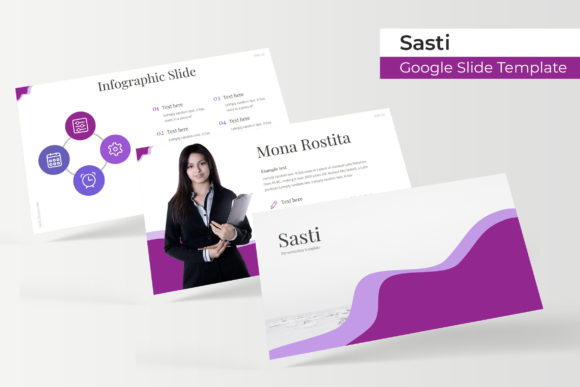
The Sasti Google Slide Template is built around the idea of providing a complete set of slides that you can adapt without having to design individual layouts yourself. With 150 total slides organized across five premade color variations, you get 30 slides per template file. That means you are not limited to one color scheme. If your brand uses a specific palette, or if you are preparing separate presentations for different departments or clients, having five distinct color options within the same base design system can save considerable time.
The template includes handcrafted infographics, which are essentially prebuilt visual elements such as timelines, process flows, comparison charts, and data displays. These are the kinds of components that many presenters struggle to create from scratch, especially if they are not comfortable with design software. Having them ready to go means you can focus on your content rather than on building charts in PowerPoint or Google Slides.
Additional structural slides include section break slides, which help divide your presentation into clear chapters, and gallery or portfolio slides, which are useful for showcasing images, team members, or project examples. The template also relies on master slides, so any global changes you make—such as updating a font or repositioning a logo—apply across all slides that use that layout. This is a practical feature for maintaining consistency without editing each slide individually.
Comparing This Approach with Custom Design and Simpler Templates
When evaluating the Sasti Google Slide Template, it helps to consider the spectrum of presentation options available. At one end, you have fully custom design, where a designer creates a unique deck tailored to your exact messaging and brand guidelines. This approach yields the highest level of originality, but it is expensive and time-consuming, often requiring multiple revisions before you have a polished result. At the other end, you have basic templates that come with a handful of slides and minimal customization, which are fine for quick internal updates but rarely leave a strong impression on external audiences.
The Sasti Google Slide Template sits somewhere in the middle. It gives you a professionally designed foundation without the cost or wait time of a custom project. The five color variations mean you can switch between looks without rebuilding your slide structure, which is a significant advantage over single-color templates. However, unlike a custom design, you are still working within a predefined layout system. If your presentation requires highly unconventional slide structures, you may find the template’s constraints limiting.
Another common alternative is using design platforms that let you create slides from modular components. These tools offer great flexibility, but they also require more upfront decision-making about layout, typography, and spacing. The Sasti Google Slide Template removes that decision burden by providing completed slide designs. For many presenters, especially those who are not design-focused, this tradeoff is worthwhile because it speeds up production and reduces the risk of inconsistent formatting.
Strengths That Matter for Day-to-Day Use
One of the strongest points of the Sasti Google Slide Template is its reliance on master slides. When you edit a master slide, every slide based on that layout updates automatically. This is especially useful for teams where multiple people are contributing slides. You can establish a consistent header style, footer, or background across the entire deck with a single edit. Without master slides, you would need to manually update each slide, which is prone to errors and inconsistencies.
The resizable and editable graphics are another practical strength. Many templates lock elements together, making it difficult to resize components without breaking the layout. With this template, you can adjust the size of icons, images, and graphics without distorting them. This matters when you are adapting a slide for a different screen ratio or when you need to fit more text than the original design anticipated.
The inclusion of picture placeholders with drag-and-drop functionality simplifies image integration. Instead of inserting an image and then manually cropping and positioning it, you drop your picture into a designated frame, and the template handles the rest. This feature is particularly helpful when you are working with a large number of images, such as in a portfolio or case study section, because it ensures uniform sizing and alignment across all photos.
The pixel-perfect illustrations also deserve mention. Vector-based illustrations scale cleanly at any resolution, so your slides will look sharp on both standard monitors and large projection screens. This avoids the blurry or pixelated appearance that can occur with low-resolution raster graphics, especially when a slide is viewed at a larger size.
Limitations and Situations Where Other Options Fit Better
No single template works equally well for every presentation scenario. The Sasti Google Slide Template, despite its breadth, has limitations that you should consider before purchasing. The five color variations are premade, so while you can choose among them, you cannot freely change the entire color scheme without some manual work. If your brand uses a very specific set of colors that do not align with the five provided palettes, you will need to adjust individual elements, which can be time-consuming if the template does not include a global color override mechanism.
Another consideration is the slide volume. At 150 slides spread across five templates, each template averages 30 slides. For a standard business presentation, 30 slides is usually sufficient. However, if you are creating a very short deck of ten slides, the template may feel overly structured, with section breaks and portfolio layouts that you do not need. You can delete slides, of course, but you may still end up with a design system designed for a longer narrative that does not adapt perfectly to a condensed format.
For presenters who need to collaborate extensively in real-time, Google Slides itself is already a strong platform. The Sasti Google Slide Template works within that environment, so collaboration is seamless. But if your team primarily uses PowerPoint or Keynote, you will need to check whether the template files import cleanly into those applications. The product description mentions it is a Google Slide template, and though it includes PPTX files, features like master slides and drag-and-drop placeholders may behave differently in non-native presentation software.
Additionally, the photographs shown in the preview are not included. This is a common practice with template previews, but it is worth noting that you will need to source your own images. If you do not have access to a stock photo library or your own photography, you will need to budget for image acquisition as a separate step. The template provides the frames and placeholders, but the visual impact of your slides will depend heavily on the quality of the images you place within them.
When This Template Is the Right Choice
The Sasti Google Slide Template is a practical fit for several common scenarios. If you are preparing a pitch deck, a project proposal, or a quarterly review and you want a professional, cohesive look without engaging a designer, the template provides a ready-made structure that covers most of the sections you will need. The five color variations let you choose a tone that matches your industry or audience—for example, a more conservative palette for a financial audience or a brighter set for a creative pitch.
For educators or trainers who create recurring presentations, having 30 slides per template with built-in infographics and section breaks can streamline the process of building lecture decks or workshop materials. You can reuse the same template framework week after week, simply updating the content inside the existing slide layouts.
Teams that need to maintain consistent branding across multiple presenters will benefit from the master slide structure. Once you set up your logo, fonts, and colors on the master slides, every team member who uses the template will be working within the same visual system. This reduces the likelihood of inconsistent branding across different presentations within the same organization.
When You Might Need a Different Approach
If your presentation requires a highly distinctive visual identity that stands out from typical template-driven decks, you may be better off investing in a custom design. Templates, by their nature, follow familiar layout conventions. While the Sasti Google Slide Template is well executed, it cannot replicate the uniqueness of a design built from the ground up around your specific content.
Similarly, if you are creating a short, informal internal update where only a few slides are needed, a lightweight template with fewer slides and less structure may be more appropriate. You would not need 30 slides of infographics and portfolio layouts for a five-minute standup meeting. In that case, a simpler template or even a blank slide with minimal formatting would save you the effort of stripping down a more elaborate design.
For presenters who want complete control over every visual element—such as advanced animations, custom chart types, or non-standard aspect ratios—the template may feel restrictive. Even with resizable graphics, you are still working within the template's original design logic, and radical departures from that logic can be difficult to achieve cleanly.
Making an Informed Decision
The Sasti Google Slide Template offers a strong balance of variety, structure, and ease of use. Its five color variations, handcrafted infographics, section breaks, and portfolio slides cover a wide range of presentation needs, while the master slide system and picture placeholders reduce the technical friction of building a deck. The product includes five PPTX files with widescreen format and a readme file with font download links, so you have everything you need to get started beyond your own images and content.
To decide if this template is right for you, consider your typical presentation volume, your need for brand consistency, and how much time you can afford to spend on design. If you frequently build decks that require multiple sections, visual data, and image galleries, the Sasti Google Slide Template can give you a solid head start. If your needs are minimal or highly custom, other approaches may serve you better. By understanding both the strengths and the limitations, you can choose a presentation resource that genuinely supports your work rather than adding unnecessary overhead.