Lide Power Point Template: A Versatile Presentation Solution for Creators, Marketers, and Small Business Owners
Presentations are part of everyday life, whether you are pitching an idea to a client, teaching a class, sharing a portfolio, or running a community workshop. The challenge is often finding a template that looks polished without forcing you to start from scratch every time. That is where Lide Power Point Template comes in. It is designed to handle a wide range of presentation needs with minimal effort, offering 150 slides spread across five color variations, each with 30 slides. This structure alone makes it a practical option for anyone who needs consistency across multiple decks.
What Makes Lide Power Point Template Stand Out
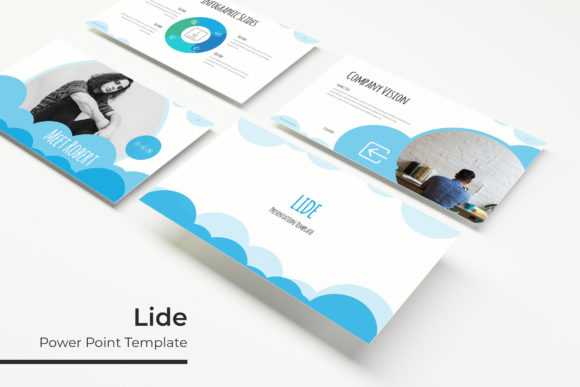
Rather than giving you one rigid design, Lide provides five distinct color variations, each functioning as a full standalone template. This means you can pick a color scheme that fits your brand or mood without reworking the layout yourself. The 150 total slides are not just filler—they include handcrafted infographics, section break slides, gallery and portfolio pages, and resizable graphics that you can edit directly in PowerPoint.
One feature that saves real time is the picture placeholder system. Instead of wrestling with image sizing, you simply drag and drop your photos into pre-set frames. The slides are built on master slides, so any global change you make updates across the entire deck. For anyone who has spent hours tweaking alignment or resizing images, this alone is a major relief. The illustrations are pixel-perfect, which means they stay sharp whether you project them on a large screen or share them as a PDF.
What you get inside the download includes five PPTX files, each in widescreen format, along with a readme file that lists the free fonts used and where to download them. The preview images you see online are not included—those are for illustration only—but the actual template slides are clean and ready for your content.
Where and When You Might Use This Template
The real strength of Lide becomes apparent when you think about the variety of situations where a presentation is needed. It is not just for the boardroom. People use PowerPoint decks for client proposals, educational modules, product catalogs, event recaps, and even personal projects like wedding albums or travel journals. The key is having a template that adapts to the tone of the content without requiring design skills.
Because Lide offers five color schemes, you can switch between a professional dark palette for a corporate pitch and a lighter, more creative look for a community event. The infographic slides are useful when you need to explain data or processes without overwhelming your audience with text. Section break slides help organize longer presentations, giving the viewer a mental pause before moving to the next topic. Gallery and portfolio slides are ideal for showcasing work, whether you are a photographer, designer, or someone presenting case studies.
For Freelancers and Consultants
If you are a freelancer, your presentation often serves as the first impression. A client wants to see that you are organized and that you understand their industry. With Lide, you can prepare a pitch deck that feels custom-made without spending hours on layout. The picture placeholders are especially useful if you include screenshots or mockups of past work. You simply drop in your images, replace the placeholder text, and your deck is ready.
The slide variety also helps when you need to present a proposal, show a timeline, and then walk through case studies—all within the same visual theme. Because the template includes multiple color options, you can adapt the same deck for different clients by switching the color scheme to match their brand guidelines. That is a small change that makes your work feel personalized without a full redesign.
For Small Business Owners and Entrepreneurs
Small business owners often wear many hats, and not everyone has a dedicated marketing person who designs slides. When you need to present at a local networking event, apply for funding, or introduce a new product to your team, the Lide template gives you a professional look quickly. The handcrafted infographics are particularly practical for explaining business metrics like revenue growth, customer demographics, or operational workflows.
The resizable graphics mean you can adjust icons and illustrations to fit your content without worrying about distortion. If you run an e-commerce store, the gallery slides work well for displaying product shots. The section break slides help separate different parts of your presentation—like company overview, product details, and financial projections—so the audience follows along easily.
For Educators and Trainers
Educators and corporate trainers need presentations that are clear, engaging, and easy to update. Lide’s master slide structure allows you to change fonts, colors, or backgrounds across the entire deck in one go. This is useful when you want to apply your school’s branding or match a specific training module’s theme. The infographic slides are great for breaking down complex topics into visual steps.
If you teach a recurring course, you can save time by reusing the same template each semester. You simply update the content and swap out images. The portfolio slides can also serve as student showcase pages or project galleries. The drag-and-drop image placeholders make it easy for non-designers to maintain a consistent look.
For Marketers and Content Creators
Marketers often need to repurpose the same content across different formats. A deck created in Lide can be exported as a PDF for client reports, presented live at a meeting, or even recorded as a video voiceover. The widescreen format works well for YouTube thumbnails and social media previews if you share a summary slide online.
The five color variations are helpful when you are A/B testing visual styles or creating decks for different campaigns. You can keep the same content structure but use a different color palette to match seasonal promotions or event themes. The section break slides allow you to insert call-to-action moments within a longer presentation, guiding the audience toward the next step.
For Hobbyists and Community Leaders
Not every presentation is about business. Hobbyists who run workshops, lead community groups, or organize events also benefit from a clean template. Whether you are presenting a slideshow at a local club meeting, sharing a photo collection from a group trip, or giving a talk at a library, Lide provides a structure that feels intentional without being overly formal.
The gallery and portfolio slides are perfect for showcasing images from events or projects. The handcrafted infographics can illustrate simple concepts like a timeline of activities or a comparison of different approaches. Because the template includes 30 slides per color variation, you have enough flexibility to create a short, focused deck without running out of page types.
Practical Considerations Before You Download
Before you choose Lide Power Point Template, there are a few things worth thinking about. First, the photographs shown in the preview are not included, so you will need your own images. This is standard, but it is worth mentioning because the final look of your presentation depends on the quality of your photos and graphics. Plan to use high-resolution images that match the slide dimensions for the best result.
The font links are provided in the readme file, and the fonts are free to download. Make sure to install them before you start editing, otherwise PowerPoint might substitute a different font that could break the layout. The template works with standard PowerPoint versions that support PPTX files, so compatibility is generally good across Windows and Mac.
If you are not familiar with master slides, you might want to spend a few minutes learning the basics. Master slides allow you to change the look of every slide at once, which is one of the template’s strongest features. Once you understand how to edit the master, you can customize colors, fonts, and backgrounds without touching each slide individually. That small learning curve pays off quickly.
Also consider your content length. With 30 slides per color variation, you have enough space for a detailed presentation, but you can also remove slides you do not need. The template is designed to be scalable, so you can build a 10-slide pitch or a 40-slide report using the same structure. The key is to choose the right mix of slide types—infographics, section breaks, galleries, and text slides—to match your story.
Finally, think about the color palette. Each of the five variations has a pre-made scheme, but because the template is editable, you can adjust the colors further if needed. The readme file includes information on how the colors are set up, so you can tweak them to match your brand. That flexibility makes Lide suitable for both short-term projects and ongoing use.
Whether you are preparing a client pitch, a training module, a product showcase, or a community talk, having a template that covers the basics and then some means you spend less time on formatting and more time on your message. Lide Power Point Template delivers that balance through its structure, variety, and attention to practical details like master slides and placeholders. If you regularly create presentations, it is worth considering as a foundation you can rely on again and again.