Segiri Power Point Template: A Versatile Presentation System for Professionals
If you've ever spent hours adjusting slide layouts, hunting for matching color schemes, or trying to make a presentation look cohesive across thirty slides, you already know the pain of working with rigid templates. The Segiri Power Point Template takes a different approach. Rather than handing you a single design and calling it done, this system gives you five complete color variations with thirty slides each, totaling 150 carefully crafted slides. That's not just a template—it's a flexible presentation toolkit designed for people who need to maintain visual consistency across multiple projects or adapt quickly to different brand guidelines.
What Makes the Segiri System Different
Most presentation templates offer one color scheme and a handful of layouts. Segiri flips that model on its head. You get five separate PPTX files, each built around a distinct premade color palette. Every file contains thirty fully editable slides, which means you're not limited to one look. If you're presenting to a conservative corporate board, you choose the muted professional palette. If you're pitching a creative campaign to a design-forward client, you switch to the bold variation. The same content block structure carries across all five versions, so your message stays consistent while the tone shifts visually.
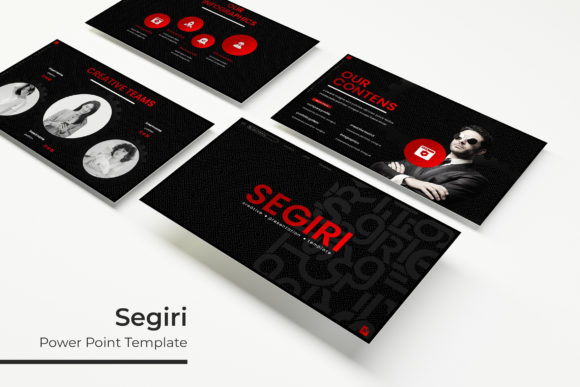
The handcrafted infographics deserve special attention. These aren't auto-generated diagrams that look generic and disconnected from your content. Each infographic element was built specifically for this template system, with clean proportions and clear visual hierarchy. You'll find section break slides that help you transition between topics smoothly, gallery slides for showcasing portfolios or case studies, and dedicated portfolio layouts that put your work front and center. The picture placeholders use a drag-and-drop system, which saves time when you're swapping images in and out during the editing process.
Visual Personality and Design Appeal
The Segiri Power Point Template leans into modern, clean aesthetics without feeling cold or sterile. The typography choices, layout spacing, and iconography all point toward a design-first mindset. This isn't a template that tries to cram as much information onto a slide as possible. Instead, it respects negative space and uses it strategically to guide the viewer's eye. The color variations range from neutral corporate tones to more vibrant, saturated options, giving you room to match existing brand identity or set a specific mood for your presentation.
Because the template relies on master slides, every change you make propagates consistently across your entire deck. That's a small detail that becomes incredibly valuable when you're adjusting a headline style or tweaking a color accent on slide fifty-seven and need it to apply everywhere. The pixel-perfect illustrations reinforce the professional polish. These aren't rough sketches or generic clip art—they're vector-quality graphics that scale cleanly and integrate with the overall design language.
Where Segiri Works Best Across Industries and Projects
For brand strategists and marketing professionals, the five-color system is a practical advantage. You can build a presentation for one client using the blue variation, then repurpose the same structure for another client using the green or orange palette without starting from scratch. The portfolio slides also make it easy to showcase case studies, campaign results, or visual work samples within the same deck.
Entrepreneurs and small business owners will appreciate the time savings. When you're pitching to investors, speaking at a conference, or presenting quarterly results to your team, you need a presentation that looks like you invested serious design resources. Segiri delivers that look without requiring you to hire a graphic designer or spend hours learning advanced PowerPoint features.
Content creators, bloggers, and publishers often need presentations for webinars, workshops, or sponsored content collaborations. The clean layouts work well for text-heavy slides that still need visual breathing room. The section break slides help divide recorded content into digestible segments, and the gallery slides are ideal for showcasing featured articles, product shots, or portfolio highlights.
Designers and creative professionals will find the handcrafted infographics useful for data-heavy presentations where you need to communicate complex information clearly. The infographics follow best practices for visual hierarchy, so your audience can quickly grasp the key takeaways without squinting at cluttered charts.
Readability, Visual Hierarchy, and Brand Perception
Good typography isn't just about choosing a pretty font. It affects how quickly your audience absorbs information and how seriously they take your content. The Segiri system uses clean, modern typefaces that prioritize legibility at various sizes. Headlines stand out clearly, body text remains readable, and callout elements draw attention where it matters most.
Visual hierarchy in Segiri is baked into the layout structure. Each slide type has a clear focal point. Whether it's a headline, a key statistic, or a featured image, your viewer knows where to look first. That intentional design reduces cognitive load and helps your message land faster. For brand perception, consistency is everything. When every slide in your deck follows the same spacing rules, color logic, and typographic rhythm, your audience perceives a level of professionalism and attention to detail that reflects positively on your brand or organization.
Practical Guidance for Choosing and Using the Template
Before you start building your presentation, take a few minutes to evaluate which of the five color variations fits your project best. Consider your audience's expectations and the context of your presentation. A financial services pitch likely calls for a more conservative palette. A creative agency portfolio can afford a bolder, more distinctive color scheme. You're not locked into one choice—you can always switch to a different variation for your next project.
Font pairing is handled through the included font recommendations. The template uses a clean display-friendly typeface that works well for headlines, paired with a readable body font. The free font download link included in the package ensures you have exactly what you need without hunting for alternatives. If you need to swap in a custom brand typeface, the master slides make that straightforward. Just update the master slide text styles, and your entire deck follows suit.
When testing the template for commercial licensing, note that the standard terms cover business and commercial use. The font files linked in the documentation carry their own licensing, so be sure to review the foundry's terms if you plan to embed the font in distributed files or use it in branding materials beyond the presentation itself. The photographs shown in the preview are not included, which is standard for premium templates. You'll need to supply your own images, but the drag-and-drop placeholders make that process quick and painless.
For content creators who produce multiple presentations regularly, the five-file system is a practical investment. You can build a library of branded decks using the same structural framework, swapping only the color palette and imagery to match each client or campaign. This approach saves time, ensures quality control, and keeps your presentations looking consistent even when you're working at scale.
The resizable and editable graphics mean you're not stuck with the default sizes. If you need to expand a chart area, enlarge an icon, or adjust a photo frame, you can do that without breaking the layout. The pixel-perfect illustrations maintain their crispness regardless of how you scale them, which matters when you're projecting on a large screen or exporting high-resolution PDFs for printing.
Ultimately, the Segiri Power Point Template is built for people who value efficiency without sacrificing visual quality. The five-color system, handcrafted infographics, and master-slide architecture work together to reduce friction in the presentation creation process. Whether you're a seasoned designer who needs a reliable base deck or a business owner preparing your first major pitch, the structure supports your content without getting in the way. That's the kind of practical design thinking that makes a template worth keeping in your toolkit for the long haul.