San Moire Power Point Template: A Detailed Review of Its 150-Slide Presentation System
When you are building a professional presentation, the template you choose sets the tone for your entire message. The San Moire Power Point Template is a large-scale slide collection designed for users who need variety, structural consistency, and visual polish without starting from scratch. With 150 total slides spread across five color variations, this template aims to reduce repetitive design work while giving you enough material to cover a wide range of presentation scenarios. This article examines what the template offers, where it excels, what tradeoffs to consider, and how to decide if it aligns with your specific project needs.
What Is San Moire Power Point Template?
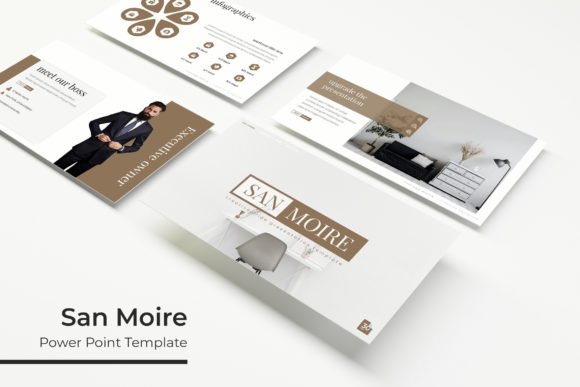
The San Moire Power Point Template is a pre-built presentation system that includes five separate PPTX files, each representing a distinct color variation. Each file contains 30 slides, bringing the total to 150 slides across the full set. The template is built on master slides, meaning global changes to fonts, colors, or layouts can be applied consistently throughout a presentation. It also includes handcrafted infographics, section break slides, and a dedicated gallery and portfolio slide, making it suitable for portfolio reviews, company overviews, or project pitches. The graphics are described as pixel-perfect illustrations, and the layout relies on picture placeholders that support drag-and-drop image insertion.
Beyond the slide files, the package includes a Readme file and a note about the fonts used, along with a link to download them for free. It is important to note that the preview images and photographs shown in the template listing are for illustration only and are not included with the purchase.
Why Consider a Multi-Color, Multi-File Template?
Most presentation templates offer a single color scheme or a limited set of variations. The San Moire Power Point Template takes a different approach by providing five complete files, each with a different premade color set. For someone who creates presentations for multiple clients, departments, or branding contexts, having five ready-to-use color options in one purchase can save time. You do not need to manually recolor slides or worry about breaking the design when adjusting hues. Each file is self-contained, so you can open the color variant that matches your needs and start editing immediately.
Another practical benefit is the slide count. With 30 slides per file, you have enough layouts to cover most standard presentation sections: title slides, agendas, content slides, data visualizations, timelines, team introductions, and closing slides. The inclusion of a gallery and portfolio slide also points to use cases in creative fields, where showing work samples is essential. The handcrafted infographics add a layer of visual storytelling that goes beyond basic bullet points, which can be helpful when you need to explain processes, comparisons, or data trends.
Master Slide Architecture
The template is based on master slides, a feature in PowerPoint that allows you to define global styles for fonts, colors, backgrounds, and placeholders. If you need to change the heading font across all slides, you can do it once on the master slide, and it updates everywhere. This is a significant time-saver compared to editing each slide individually. For teams or individuals who produce presentations frequently, master slide support reduces the risk of inconsistent formatting.
Resizable and Editable Graphics
All graphic elements in the San Moire Power Point Template are resizable and editable. This means you can scale icons, illustrations, and infographic components without losing quality. The template uses vector-based elements, so resizing does not cause pixelation. This is particularly useful when you need to adapt a layout to fit a specific amount of content or when you are projecting onto a large screen and need elements to remain crisp.
Picture Placeholders with Drag-and-Drop
Instead of static image boxes, the template uses picture placeholders. You drag an image file onto the placeholder, and it automatically fits into the designated frame. This removes the need to manually crop, resize, or reposition photos. For users who work with many images—such as photographers, designers, or real estate agents—this feature can significantly speed up slide creation.
Pixel-Perfect Illustrations
The illustrations included in the template are described as pixel-perfect, which suggests careful attention to alignment, spacing, and resolution. When you combine these illustrations with the infographics, the template offers a polished, modern look that can help your presentation appear professionally designed without requiring advanced graphic design skills.
Five Color Variations, One Purchase
Each of the five PPTX files comes with a different premade color set. This is not a single template with a color picker; it is five separate presentations. If you work in an environment where brand colors change by project or client, you can select the closest match and then make minor adjustments. However, if you only need one color scheme, you may not use the other four files, which is a factor to consider when evaluating value.
Where San Moire Power Point Template Shines
This template is a strong fit for professionals who need to produce presentations regularly and want a consistent visual language across multiple projects. Freelancers, marketing teams, consultants, and agency owners may find the five-color system useful for separating client work or departmental presentations. The 30-slide per file structure is enough for a comprehensive pitch deck or a detailed project report, yet not so large that you feel overwhelmed by choices.
The inclusion of section break slides and a portfolio slide makes the template particularly well-suited for creative portfolios, design showcases, or company capability decks. If your work involves displaying images—whether product shots, project photos, or team headshots—the drag-and-drop picture placeholders reduce friction. The handcrafted infographics also give you a way to present data or processes in a visually engaging manner without needing to create charts from scratch.
Another situation where this template is a good choice is when you are working under a tight deadline. Because the master slides are pre-configured and the color variants are ready to use, you can open a file, replace the placeholder text and images, and have a professional presentation in a short amount of time. The Readme file and font download link also help you get set up quickly without hunting for missing fonts.
Tradeoffs and Considerations
While the San Moire Power Point Template offers considerable convenience, there are tradeoffs to keep in mind. First, the template is provided in PPTX format only. If you use a different presentation platform such as Google Slides, Keynote, or Canva, you will need to convert the file, which may cause layout shifts or loss of formatting. Some features, like master slides and custom fonts, may not transfer perfectly to other platforms. If you work exclusively in PowerPoint, this is not an issue, but for users in mixed-platform environments, it is something to test before committing.
Second, the photos used in the preview are not included. The template provides frames and placeholders, but you must supply your own images. If you do not have a library of high-quality photos, you may need to purchase stock images or take new photos, which adds time and cost. Make sure you have image sources available before planning to use the template for a client-facing presentation.
Third, the five-color variation system means you get five separate files. If you only plan to use one color scheme, the other four files remain unused. While this is not a flaw, it means the value is higher if you actually need multiple color options. If you are a single-project user, a template with a single but highly customizable color set may be more cost-effective.
Another consideration is the learning curve. Even though the template is built on master slides, some users may find it takes time to understand how to properly edit master slides, replace placeholders, and customize infographics without breaking the design. If you are new to PowerPoint or not comfortable with its more advanced features, you might need to invest a little time learning how to navigate the template effectively.
When Alternatives May Be Worth Considering
If your presentation needs are minimal—for example, you only need 10 to 15 slides for a one-time meeting—a 150-slide template may be more than you need. In that case, a smaller, more focused template could save you time by offering only the layouts you actually use. Similarly, if you work in a highly specialized field such as medical research or engineering, you may need charts, diagrams, or data visualization tools that go beyond what a general-purpose template provides. In those situations, a niche-specific template might be a better fit.
Another scenario where alternatives make sense is if you require extensive animation, video embedding, or interactive elements. While the San Moire Power Point Template offers static slides with editable graphics, it is not designed for complex multimedia presentations. If your goal is to create a self-running kiosk display or an interactive e-learning module, you may need a more specialized tool or a template built for that purpose.
Finally, if you are on a very tight budget, you might consider free templates available online. However, free templates often come with limitations: fewer slide variations, less consistent design, no master slide support, or missing fonts. The tradeoff is cost versus quality and convenience. The San Moire template fills a middle ground—it is not free, but it offers a structured, professional system that can save hours of design work.
Practical Decision-Making Insights
Before purchasing the San Moire Power Point Template, consider the following questions to determine if it aligns with your goals:
- Do you create presentations for multiple clients or projects that require different color schemes? If yes, the five-color system is a practical advantage.
- Do you use PowerPoint as your primary presentation tool? If yes, the PPTX format and master slide support will work seamlessly.
- Do you have your own image library or access to stock photos? If not, factor in the additional cost and time for sourcing images.
- Do you need 30 slides per presentation, or would a smaller set be sufficient? The 150-slide count is best for users who build comprehensive decks regularly.
- Are you comfortable editing master slides and working with placeholders? If you prefer a simpler drag-and-drop experience without any learning curve, you may need to test the template first.
For users who answer yes to most of these questions, the San Moire template offers a solid structure that can streamline your presentation workflow. The handcrafted infographics, pixel-perfect illustrations, and consistent layouts reduce the time spent on design decisions, allowing you to focus on content and delivery. The inclusion of a gallery and portfolio slide also makes it a versatile choice for creative professionals who need to showcase work visually.
On the other hand, if you need a single-use presentation with minimal slides, work outside of PowerPoint, or require extensive custom animation, you may find better value in a smaller or more specialized template. The key is to match the template's strengths to your specific workflow and presentation goals.
Final Thoughts
The San Moire Power Point Template is a comprehensive presentation system built for users who value consistency, variety, and professional design. Its five-color, 150-slide structure supports multiple projects and branding needs, while the master slide architecture and editable graphics provide flexibility. The drag-and-drop picture placeholders and handcrafted infographics add practical convenience for image-heavy or data-driven presentations.
Like any tool, its value depends on how well it fits your use case. If you are a regular PowerPoint user who creates detailed presentations across different contexts, the time saved by having five ready-to-use color variants and 30 cohesive slides per file can be substantial. If your needs are simpler or your platform differs, you may want to explore alternatives. By weighing the features against your own workflow and content requirements, you can make an informed decision about whether this template supports your presentation goals effectively.