Maximizing Presentation Impact with the Flazz Keynote Template
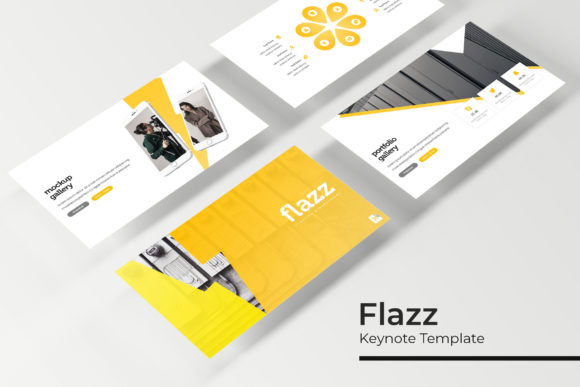
Creating a compelling presentation often feels like a balancing act between visual appeal, structural clarity, and time constraints. Professionals across industries seek tools that reduce repetitive design work while still allowing for a polished, customized outcome. The Flazz Keynote Template addresses this need by offering a comprehensive slide library built around flexibility and visual consistency. With 150 total slides distributed across five distinct color variations, this template provides a substantial foundation for everything from corporate pitches to educational workshops. Understanding how to leverage its components—from handcrafted infographics to master slide-based layouts—can significantly elevate the quality of any presentation while saving hours of manual formatting.
Understanding the Scope of a 150-Slide Presentation Template
A 150-slide template might initially seem excessive, but the value lies in the variety and specialization it offers. Rather than forcing users to adapt a single layout for every type of content, the Flazz Keynote Template provides dedicated slides for diverse purposes. Each of the five premade color sets includes 30 slides, meaning users can choose a color direction that aligns with their brand or topic and immediately access a full suite of slide types. This structure allows presenters to maintain a cohesive look throughout a lengthy deck without duplicating the same few layouts. The sheer volume of slides also supports longer presentations, such as training modules, annual reports, or multi-section proposals, where visual variety keeps the audience engaged across dozens of screens.
The five color variations are not simply palette swaps; they represent curated themes that change the tone of the entire presentation. A cool blue variation might suit a financial services pitch, while a warm earth tone could better serve a sustainability-focused talk. Users working across multiple projects can switch between color sets without needing to rebuild slides from scratch. This modular approach transforms the template into a scalable resource, particularly for agencies or consultants who produce presentations regularly under different brand guidelines.
The Role of Color Variations in Presentation Design
Color consistency remains one of the hardest elements to maintain when building a presentation from scratch. Even small discrepancies in hue or saturation can make a deck feel disjointed. The Flazz Keynote Template eliminates this problem by providing five fully coordinated color variations, each applied uniformly across its 30 slides. This ensures that every chart, icon, background, and text element within that variation shares a harmonious palette. Presenters no longer need to manually match accent colors or worry about importing inconsistent branding elements from external sources.
For users who need to align the presentation with existing company colors, the editable graphics and resizable elements make it straightforward to adjust. The template does not lock users into rigid color schemes; rather, it offers a starting point that can be customized further. This hybrid approach—premade yet flexible—suits both those who want a fast design solution and those who need to fine-tune every detail. Having five premade options also speeds up the decision-making process, as users can preview which palette best amplifies their message before investing time in customization.
Building Visual Narratives with Section Breaks and Portfolio Slides
Long presentations benefit from clear structural signposts that guide the audience through different topics. The inclusion of dedicated section break slides in the Flazz Keynote Template addresses this need directly. These slides act as visual pauses, signaling a transition between major parts of the presentation. Instead of abruptly moving from one topic to another, speakers can use a section break to reset the audience's attention, introduce a new theme, or simply provide a moment of reflection. This technique is especially effective in educational settings or multi-chapter business proposals where the flow of information needs to be carefully managed.
Gallery and portfolio slides further enhance the narrative toolkit. For professionals in creative fields—photographers, designers, architects, or marketers—showcasing work samples is often a core objective. The portfolio slide layouts within the Flazz Keynote Template are designed to display images cleanly, with placeholder areas that maintain consistent spacing and alignment. These slides allow multiple images to be presented without clutter, making them ideal for case studies, project showcases, or product catalogs. The picture placeholders support drag-and-drop insertion, so swapping out sample images for actual content is a matter of seconds rather than manual resizing.
Enhancing Clarity Through Handcrafted Infographics
Data-heavy presentations risk overwhelming the audience if information is presented in dense paragraphs or raw spreadsheets. Handcrafted infographics bridge this gap by translating complex data into visual stories. The Flazz Keynote Template includes infographic elements designed with precision, using pixel-perfect illustrations that maintain clarity at any display size. These infographics are not generic clip art; they are crafted to integrate seamlessly with the overall slide design, sharing the same typographic and color standards as the rest of the deck.
Using prebuilt infographics also ensures that visual hierarchy is maintained. Key data points can be emphasized through size, color contrast, and placement, guiding the viewer's eye to the most important takeaways. For example, a slide comparing quarterly sales figures might use a combination of bar charts and icon-based callouts, both of which are available as resizable components within the template. The infographics are fully editable, meaning users can update numbers, labels, and even the underlying graphics without breaking the design integrity. This is particularly valuable for recurring reports where only the data changes from period to period.
Another advantage of handcrafted infographics is their consistency across slides. When every chart and diagram in a presentation follows the same visual language, the audience can focus on the information rather than being distracted by inconsistent styling. The Flazz Keynote Template enforces this consistency through master slides, which apply baseline formatting to all slide types. Users can trust that any infographic they add will automatically inherit the correct colors, fonts, and spacing parameters.
Streamlining Workflows with Master Slides and Drag-and-Drop Placeholders
Efficiency in presentation design often comes down to how easily a template integrates into the user's workflow. Master slides form the backbone of this efficiency in the Flazz Keynote Template. By defining layout elements at the master level, the template ensures that changes to fonts, background colors, or footer information propagate instantly across all slides that use that master. This is a significant time-saver when adjusting a deck for different audiences or updating branding elements midway through a project.
The drag-and-drop picture placeholders further simplify the process of adding visual content. Rather than manually cropping, resizing, and positioning images, users can simply drag an image onto the placeholder, and the template handles the rest. The placeholder frames maintain the correct aspect ratio and position, so images appear polished without additional tweaking. This feature is particularly useful for teams where multiple people contribute slides, as it reduces the chances of formatting inconsistencies arising from individual editing habits.
Resizable and editable graphics are another workflow booster. Icons, illustrations, and shape-based elements can be scaled up or down without losing resolution, thanks to the vector-based approach. Users can also change the color of individual graphic elements to match their specific needs. For instance, a blue infographic from the corporate palette can be quickly recolored to red for a presentation that requires urgent call-to-action visuals. The pixel-perfect illustrations ensure that even after scaling, the graphics remain crisp on high-resolution displays or projectors.
Practical Considerations When Using the Flazz Keynote Template
While the template provides an extensive slide library, it is important to remember that the photographs and pictures shown in the preview are for illustration purposes only. Users need to supply their own images. The placeholder system makes this substitution straightforward, but the quality of the final presentation still depends on the visuals chosen. High-resolution, relevant images will amplify the template's strengths, while poorly chosen or low-quality images can diminish the professional appearance.
Font licensing is another consideration. The template includes a readme file with information about the fonts used, along with a download link for free fonts. Users should review the license terms for any fonts they intend to use, especially if the presentation will be shared widely or used commercially. The free fonts included or recommended are generally safe for most use cases, but confirming this avoids potential issues down the line.
The five PPTX files included (one for each color variation) provide a practical starting point. Each file is already set to widescreen format, which aligns with modern display standards. Users working on presentations for older projectors or specific aspect ratios may need to adjust the slide dimensions, though the master slide structure makes this adjustment less disruptive than it would be in a non-template file.
Adapting the Template for Different Audiences and Contexts
The versatility of the Flazz Keynote Template makes it suitable for a broad range of users. Business owners can use the portfolio slides to present case studies to potential clients, while educators might rely on the infographics and section breaks to structure multi-lesson modules. Researchers presenting at conferences benefit from the clean, distraction-free layouts that keep the focus on data rather than decorative elements. Hobbyists giving talks at community events can quickly assemble a polished deck without needing professional design skills.
For teams working collaboratively, the template's reliance on master slides and standardized layouts reduces friction when merging slides from different contributors. Each team member can work within the same color variation and layout structure, ensuring that the final presentation feels cohesive even if it was assembled from separate parts. The editable nature of all graphics and placeholders means that last-minute changes—whether to data, images, or text—do not require a complete redesign.
Consider a scenario where a marketing team prepares a quarterly review. They need slides for financial data, campaign highlights, team updates, and future strategy. Using the Flazz Keynote Template, they can pull from the infographic slides for the financial section, gallery slides for campaign visuals, and section breaks to delineate each major topic. The consistent color theme ties everything together, and the master slides ensure that any late-stage branding adjustments are applied uniformly. This workflow not only saves time but also produces a more professional result than a patchwork of individually designed slides.
Leveraging Pixel-Perfect Illustrations for High-Stakes Presentations
When presenting to executives, investors, or large audiences, every visual detail matters. Pixel-perfect illustrations within the Flazz Keynote Template provide the precision needed for high-stakes environments. These illustrations are meticulously crafted so that lines, curves, and alignments meet exacting standards. In practice, this means icons and diagrams appear sharp and intentional, even when projected onto large screens. The absence of jagged edges or misaligned elements builds credibility with the audience, signaling that care was taken in preparing the presentation.
The resizable nature of these illustrations also supports responsive design. Whether the presentation is viewed on a laptop, tablet, or ultra-wide monitor, the graphics adapt without distortion. This is increasingly important as more presentations are delivered remotely, where viewers may be using a variety of devices. A slide that looks crisp on a 13-inch screen should also look professional on a 27-inch display; pixel-perfect vector elements make this possible.
Furthermore, the handcrafted aspect of the infographics and illustrations means they are original to the template. Users are not relying on overused stock graphics that might feel generic. The visual language of the Flazz Keynote Template is distinctive enough to give presentations a unique identity while remaining professional and accessible. For users who want to further differentiate their decks, the editable graphics allow for custom color adjustments or the addition of personal branding elements.
Getting Started with the Included Files and Resources
Upon downloading the Flazz Keynote Template, users receive five PPTX files corresponding to the five color variations, plus a readme file with setup instructions. The readme outlines the fonts used and provides a link to download them if they are not already installed. This upfront clarity helps avoid missing font errors that can disrupt the design when opening the file on a different system. The template structure is based entirely on master slides, so users are encouraged to explore the master view to understand how the different layouts are organized. Familiarity with the master slide approach unlocks the full potential of the template, allowing users to make global changes efficiently.
The widescreen format is ideal for most modern presentations, and the five PPTX files eliminate the need to manually switch color themes. Users who need additional customization can mix elements from different color variations by copying slides between files, though this is generally unnecessary given the breadth of slides within each variation. The included illustrations and infographics cover a wide range of topics, from business metrics to abstract concepts, making the template suitable for diverse content types without requiring external graphic resources.
Ultimately, the Flazz Keynote Template serves as a comprehensive foundation for presentation creation. Its 150 slides, five color variations, handcrafted infographics, section breaks, portfolio layouts, and master slide architecture combine to offer both depth and flexibility. By understanding how each component contributes to the overall presentation ecosystem, users can create decks that are not only visually appealing but also structurally sound and audience-focused. Whether used for a one-time pitch or as a recurring resource for multiple projects, this template provides tools that enhance both the creator's efficiency and the viewer's experience.