Prixi Google Slide Template: A Versatile Presentation Tool
Presentations are a constant in modern life. Whether you are pitching a business idea, teaching a class, reporting quarterly results, or sharing a creative portfolio, the visual quality of your slides can determine how your message lands. The Prixi Google Slide Template offers a structured yet flexible solution for building polished presentations without starting from a blank canvas. With 150 total slides spread across five premade color variations, each containing 30 slides, this template aims to reduce design time while maintaining a professional look.
This article explores what the Prixi Google Slide Template includes, who might benefit from using it, and how different users can approach it based on their own priorities. Whether you are a beginner or an experienced presenter, understanding what this template offers can help you decide if it aligns with your needs.
What Is the Prixi Google Slide Template?
At its core, the Prixi Google Slide Template is a collection of presentation slides designed to work within Google Slides. It comes with five separate PPTX files, each featuring a distinct color scheme, so you have 30 slides per theme. The template includes handcrafted infographics, section break slides, gallery and portfolio layouts, and resizable graphics with picture placeholders that support drag-and-drop functionality.
The design is built on master slides, meaning that any changes you make to the master will apply consistently across your presentation. This is especially useful for maintaining visual coherence without adjusting each slide manually. The illustrations are described as pixel-perfect, which suggests a level of precision that can help your slides look sharp on different screen sizes.
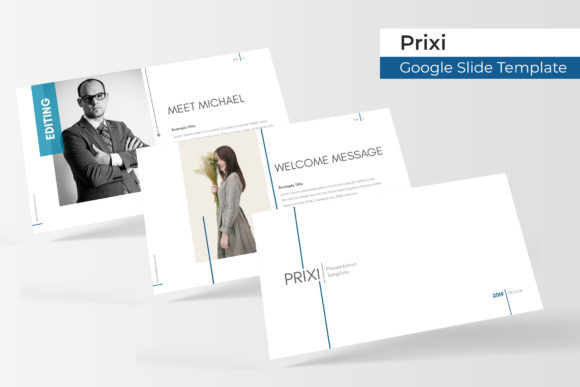
It is worth noting that the preview images include photographs for illustration only. The actual template does not include those photos, but it provides placeholders where you can insert your own images. This is a standard practice for presentation templates, and it gives you control over the final visual content.
Who Might Find the Prixi Template Useful?
Different people approach presentation tools with different priorities. A busy entrepreneur might value speed and consistency, while a designer may focus on flexibility and visual quality. The Prixi template tries to address several of these needs simultaneously, but how much it helps depends on your specific situation.
Professionals and Business Owners
If you regularly present to clients, stakeholders, or teams, the time you spend formatting slides can add up quickly. Having a template with 150 predesigned slides across five color themes means you can pick a palette that matches your brand or the tone of your presentation without building layouts from scratch. The section break slides and portfolio layouts can be particularly useful for structuring longer presentations, such as annual reports or project proposals.
For a small business owner who needs to create a pitch deck or a product showcase, the drag-and-drop picture placeholders make it straightforward to swap in product photos or team images. You do not need advanced design skills to produce a clean, professional result. The resizable graphics also mean that if your content changes, you can adjust elements without breaking the layout.
Creators and Freelancers
Freelancers often wear multiple hats, and presentation design is rarely the core skill they want to spend time on. Whether you are a photographer, a consultant, or a writer, having a portfolio slide ready can save you effort. The gallery and portfolio sections in the Prixi template are designed to showcase visual work, making it easier to present your projects in a cohesive format.
If you are a graphic designer or illustrator, you might evaluate the template more critically in terms of layout and typography. The pixel-perfect illustrations and handcrafted infographics could serve as a base that you then customize further. In this case, the template becomes a starting point rather than a final product, and the five color variations give you room to experiment before settling on a look.
Educators and Trainers
Educators need presentations that are clear, structured, and easy to follow. The section break slides can help students understand transitions between topics, while the infographic elements allow you to present data or processes visually. If you are a teacher preparing lecture materials, having a consistent template can also reduce cognitive load for your audience, as they learn to recognize the visual structure of your slides.
For trainers who create workshops or onboarding materials, the resizable and editable graphics mean you can adapt diagrams or charts to fit your specific content. The master slides feature ensures that if you add a company logo or a recurring footer, it appears on every slide automatically, saving you repetitive manual work.
Beginners and Hobbyists
If you are new to creating presentations, the Prixi template lowers the barrier to entry. You do not need to know design principles or how to use advanced software features. The drag-and-drop placeholders guide you on where to put your content, and the premade color schemes reduce the risk of choosing clashing colors. This can be especially helpful for hobbyists who want to share a personal project, a family photo album, or a community presentation without spending hours on formatting.
The free font download link included with the template also helps ensure that your text renders consistently, even if the recipient does not have the same fonts installed. This is a small detail but one that can prevent layout issues when sharing files.
Evaluating the Template Against Different Priorities
Before choosing any presentation template, it helps to clarify what matters most to you. Here is how the Prixi Google Slide Template measures up against common priorities.
Ease of Use
For most users, the template is straightforward. The master slides structure means you can edit the overall look from one place, and the picture placeholders work with a simple drag-and-drop action. Beginners will likely find this accessible. However, if you have never used master slides before, you may need a few minutes to understand how they work. The Readme file included in the download provides basic instructions, which can help get you started.
For experienced users, the template offers enough structure to be efficient without being restrictive. You can override individual slide layouts when needed, so you are not locked into a rigid format.
Cost and Value
Template pricing varies widely, but the value here comes from having 150 slides in five distinct color themes. If you were to design each slide individually, the time cost alone would be significant. For a professional who values their time, this kind of template can be a practical investment. For a hobbyist or a student, the cost may be weighed against how frequently you create presentations. If you only give one presentation per year, a free basic template might suffice. But if you present regularly, the variety and consistency provided by five themes can be worth it.
The fact that the template works in Google Slides also adds flexibility, since Google Slides is free and cloud-based, making collaboration simple. You can share the file with colleagues or classmates and work on it simultaneously.
Quality and Flexibility
The handcrafted infographics and pixel-perfect illustrations suggest attention to visual detail. For users who need a polished look, this can help your presentation feel more refined than a default theme. The five color variations also give you options without having to manually recolor elements. However, if your brand colors do not match any of the five themes, you may need to adjust colors manually. The template is editable, so this is possible, but it is something to consider if strict brand compliance is required.
Flexibility also comes from the slide variety. With gallery, portfolio, section break, and infographic slides included, you can build a narrative flow that goes beyond simple title-and-content slides. This is especially useful for longer presentations where visual variety helps maintain audience attention.
Practical Examples for Different Readers
To make this more concrete, here are a few scenarios where the Prixi template might fit well.
Scenario 1: A marketing professional preparing a campaign report. You need to show data, highlight key results, and propose next steps. The infographic slides allow you to present metrics visually rather than in dense tables. The section break slides help separate the results from the recommendations. You choose a color theme that aligns with your brand and insert screenshots or charts into the picture placeholders. The entire report comes together in a few hours instead of a few days.
Scenario 2: A freelancer building an online portfolio presentation. You want to showcase your best work to potential clients. The portfolio layouts give you a clean grid to display project images. You add brief captions and your contact information. Because the template includes five color themes, you can test which background color makes your work stand out best. You export the final version as a PDF or share it as a Google Slides link.
Scenario 3: A teacher creating a semester overview. You need slides for each unit, plus a syllabus slide and a resources slide. The section break slides can introduce each unit, and the editable graphics allow you to create simple timelines or process diagrams. Since the template is based on master slides, you can add your school logo to every slide in one step. The consistent design helps students focus on the content rather than being distracted by changing layouts.
Is the Prixi Template Right for You?
Choosing a template depends on your project type, skill level, and how much control you want over the final look. The Prixi Google Slide Template is best suited for users who need a reliable, visually cohesive starting point and want to avoid the time drain of manual formatting. It works well for presentations that benefit from structure, such as business pitches, educational modules, portfolio showcases, and reports.
If you are the type of user who enjoys fine-tuning every visual detail or if your presentation requires a completely custom design, you might find the template too prescriptive. But even in that case, the template can serve as a foundation that you modify extensively. The five color themes and editable graphics give you room to adapt.
For beginners, the template reduces the learning curve. For professionals, it speeds up workflow. For creators, it provides a polished canvas. The key is to match the template strengths to your own priorities. If you value speed, consistency, and a professional aesthetic, the Prixi template is worth considering. If you need absolute uniqueness or have very specific brand constraints, you may need to invest additional customization time.
Final Thoughts
Presentation templates are not one-size-fits-all. The Prixi Google Slide Template offers a substantial library of 150 slides across five color themes, with features like handcrafted infographics, section break slides, and resizable graphics that cater to a wide range of users. Its design on master slides and drag-and-drop placeholders make it accessible for beginners while still offering enough depth for experienced presenters.
Whether you are a business owner preparing a quarterly review, a freelancer building a client pitch, or an educator structuring a course, this template can save you time and help you deliver a more polished presentation. The free font download link and detailed Readme file add convenience, and the lack of included photographs is a transparent practice that lets you use your own imagery.
Ultimately, the right template for you is the one that aligns with your goals, your audience, and the message you want to communicate. The Prixi template is a solid option for those who want a versatile, ready-to-use presentation tool that balances design quality with practical usability.