Ethoroa – A Practical NFT Website Design Template for Marketplaces and Creators
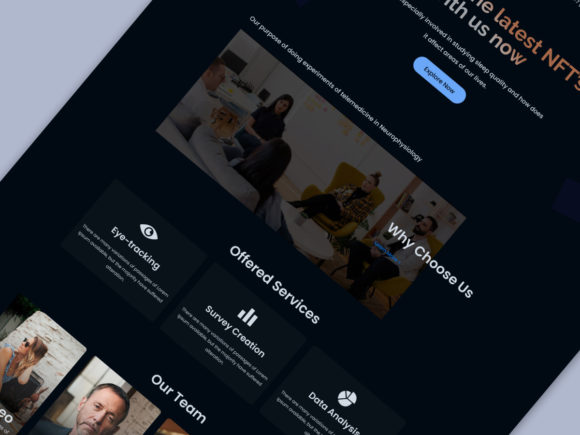
Building a marketplace for non-fungible tokens requires more than just smart contracts and blockchain integration. The interface your users interact with determines whether they stay to mint, trade, and collect, or leave before completing a single transaction. Ethoroa, an NFT website design template built for Figma, gives creators and marketplace operators a structured starting point for designing the visual and interaction layers of an NFT platform. Rather than starting from a blank canvas, you work within a pre-built system of screens, components, and layouts that reflect how NFT platforms actually function.
This article walks through where Ethoroa fits in a broader design and development workflow, how to prepare for using it, what to expect when customizing the files, and how to integrate the output into a live marketplace or portfolio site. If you are a designer building for a client, a creator setting up your own storefront, or a product manager planning a marketplace launch, understanding how a template like Ethoroa interacts with your process will save time and reduce friction.
Where Ethoroa Fits in the NFT Marketplace Workflow
Most NFT projects follow a sequence that includes concept development, smart contract creation, front-end design, back-end integration, testing, and launch. The design phase often overlaps with everything else because the visual interface determines how users interact with blockchain data. Ethoroa sits squarely in the front-end design stage, but its value extends before and after that phase as well.
Before you begin designing, you need a clear understanding of user roles. Ethoroa acknowledges two primary groups: creators who upload and mint tokens, and collectors who browse, bid, and purchase. The template includes screens that address both perspectives. This dual focus means you can model user flows for both sides without inventing layouts from scratch. During the planning phase, reviewing the template's screen list helps you identify gaps in your own user journey map. If you realize you need a screen for auction details or a creator dashboard, you can see how Ethoroa handles those scenarios and adapt accordingly.
After the design phase, the template's organized layers and naming conventions make handoff to developers more efficient. Developers can inspect the Figma file, extract spacing values, typography styles, and component states, and translate them into code without repeated back-and-forth. This reduces rework and keeps the project moving toward launch.
Using Ethoroa Before, During, and After a Design Project
The way you use a design template determines how much time it saves. Ethoroa is not a one-size-fits-all solution, but rather a foundation that you adjust to match your brand, content, and technical requirements.
Before the Project: Preparation and Scope Definition
Before opening the Figma file, define the scope of your NFT marketplace or creator portfolio. List the essential pages you need: a homepage, browse or explore page, item detail page, user profile, upload or mint page, and any administrative screens. Compare this list against Ethoroa's included pages and 43 screen UI components. The template already covers the most common screens, so your preparation work involves identifying which ones you will use directly and which ones require modification.
Also decide on your brand assets beforehand. Ethoroa uses free Google Fonts and free font-based icons, which means you can preview and swap typography and icon sets without licensing delays. Prepare your color palette, logo, and any custom imagery before you start editing. This upfront work lets you focus on layout and interaction rather than pausing to search for assets mid-project.
During the Project: Customization and Workflow Integration
Open the Figma file using Figma Desktop App version 93.4 or later. The template is layered and organized with proper naming conventions, so you can locate specific elements quickly. Start by adjusting global styles: update text styles to match your brand, swap out placeholder images for real artwork or mockups, and modify the color scheme using Figma's style tokens.
The template includes two pages in the Figma file. Use one as a master component library and the other as your working canvas. This separation keeps your source components intact while you experiment with layouts. If you need to create variations of a card or button, duplicate the component from the master page rather than modifying the instance directly. This workflow preserves consistency across all screens.
Because Ethoroa is pixel perfect and retina ready, you do not need to spend time adjusting resolution or alignment for high-density displays. Focus your effort on content hierarchy, call-to-action placement, and ensuring that the user journey from browsing to purchasing feels natural. The clean layout gives you room to add your own visual flair without fighting the underlying structure.
After the Project: Handoff and Iteration
Once the design is finalized, export assets and share the file with developers. The organized layers and clear naming make it easy for developers to inspect element properties. If your development team uses tools like Zeplin or Figma's developer handoff features, the template's structure will parse cleanly. After launch, the template remains useful for iteration. As you add features like bidding systems, staking interfaces, or community dashboards, you can extend the existing component system rather than redesigning from scratch.
Working with Ethoroa in Figma – Compatibility and Preparation
Figma compatibility matters more than it might seem. The template requires Figma Desktop App version 93.4 or later. If you use an older version or the browser version, you may encounter missing features or visual discrepancies. Before purchasing or downloading, confirm your Figma version and update if necessary. This step prevents frustration during the editing process.
The template uses free Google Fonts, so you need internet access to load them during editing. If you work offline frequently, download the font files in advance and install them locally. Similarly, the icon set is font-based, which means you can change icon size, color, and weight by adjusting text properties rather than swapping SVG files. This streamlines updates across multiple screens.
Because the files are fully layered, you can hide, lock, or rearrange elements without breaking dependencies. Use Figma's auto-layout features if you want responsive behavior, but note that the template provides a static pixel-perfect foundation. Adding auto-layout to cards or grids is straightforward if you want the design to adapt to varying content lengths.
Practical Implementation Tips for Marketplace Operators and Creators
If you are operating an NFT marketplace, your priority is reducing friction for both creators and collectors. Ethoroa's super clear and clean layout supports this goal by presenting information in a logical hierarchy. Place the most important actions—mint, buy, bid, connect wallet—in prominent positions. Use the template's existing card components to display NFT previews consistently across browse, search, and profile pages.
For creators setting up a personal portfolio, focus on the screens that highlight your work: item detail pages, collection views, and your creator profile. The template's professional and creative design helps your artwork stand out without distracting from it. Use the upload or mint page as a guide for explaining your process to collectors. Even if you do not implement full blockchain integration immediately, the visual flow helps visitors understand how your platform works.
Entrepreneurs and small business owners entering the NFT space can use the template to prototype their marketplace idea before committing to development. Show the Figma prototype to potential partners, investors, or early users. Because the interface looks polished and intentional, it communicates professionalism without requiring a fully functional backend.
Organizing Your NFT Platform: Pages, Screens, and Assets
Ethoroa includes 43 screen UI components spread across two Figma pages. This coverage means you have a reference for almost every interface a user might encounter. Rather than designing each screen in isolation, treat the template as a system. Common elements like navigation bars, search filters, user avatars, and transaction buttons appear across multiple screens. When you edit one component, the change propagates everywhere that component is used.
Organize your own assets by creating a dedicated folder structure within Figma. Keep your brand colors, logo variants, and icon set in a separate page within the same file. Link global styles from your brand page to the template components. This approach maintains consistency even as the project grows. If you later add new screens, you can pull from the template's component library and apply your brand styles automatically.
The strange interface streamlined and impress quality that the template mentions refers to the balance between visual interest and usability. Avoid overcomplicating the design with excessive animations or non-standard navigation. Users of NFT platforms expect clear calls to action, fast loading times, and intuitive browsing. The template already trends toward these principles, so your modifications should preserve or enhance clarity.
Integrating Ethoroa with Other Tools and Platforms
Design templates do not exist in isolation. Ethoroa outputs static visual designs, but those designs need to connect to smart contracts, IPFS storage, wallet integrations, and backend APIs. Use the Figma file as a source of truth for layout and interaction patterns, then hand off specifications to developers who will implement the logic.
For designers who also handle front-end development, the template's pixel-perfect layout makes it easier to translate dimensions into CSS. Measure spacing directly in Figma and translate it into rem, em, or pixel values in your code. The free font-based icons can be replaced with SVG icon sets or custom illustrations during development, but keeping them as text elements in Figma lets you test hierarchy and sizing without committing to final icon files.
If you use project management tools like Notion, Trello, or Jira, reference the template's screen list when creating tasks. Each screen can become a ticket with acceptance criteria derived from the design. This bridges the gap between visual design and development execution, especially when multiple team members work on different parts of the marketplace simultaneously.
Long-Term Considerations and Quality Control
An NFT marketplace or creator portfolio is not static. You will add features, change pricing models, update artwork, and respond to user feedback. Ethoroa's fully customizable nature means you can evolve the design over time without starting over. Keep the master Figma file updated as you make changes. If you develop new components during the build phase, add them back to the template's component page so the library remains complete.
Quality control during design involves checking consistency across all screens. Use the template's organized layers to verify that button styles, spacing, and typography match from the homepage to the checkout screen. Run through the user flow for both a creator uploading a new item and a collector purchasing one. Identify any missing states—empty states, error messages, loading indicators—and add them using the existing component styles.
If you rate or review templates as part of your workflow, providing specific feedback about what worked and what could improve helps the broader community. The request in the template description to rate it 5 stars reflects the creator's desire to know that the tool serves its purpose. From a practical standpoint, your honest evaluation also helps you clarify what you value in a design template for future projects.
Ethoroa is a tool designed to reduce repetitive layout work so you can focus on the unique aspects of your NFT platform. Whether you are a freelancer building for a client, a marketer launching a brand, or a creator establishing your own storefront, starting with a template that covers the core screens and interaction patterns lets you move faster and with more confidence. The process of preparing your assets, customizing the files in Figma, handing off to developers, and iterating after launch becomes smoother when the visual foundation is already solid.